
1-Visitor
April 23, 2013
Solved

AUTOMATICALLY OPEN PRO-E AND RUN MAP KEY

  • April 23, 2013
  • 9 replies
  • 7054 views

I HAVE 4 PRO-E LICENCE. (CREO-element/ PRO-5)
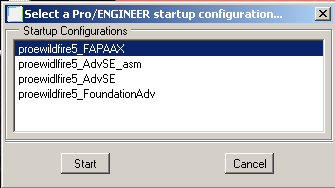
PRO E.png

now

1) I WANT TO OPEN ONE OF THE PRO-E FROM ABOVE

2) AFTER THAT I WANT TO RUN my MAP KEY ( For e.g. Map key name - XYZ )AUTOMATICALLY......... (with the help of BAT file or VBE code)

if any one know, then please share your knowledge. it will help me alot. (2nd point is more critical for me)

Best answer by MartinHanak

Hello Alok,

to run MAPKEY in EMPTY session, you can do following:

1.] launch ProE and run MAPKEY

2.] finish ProE session

3.] find trail file created by ProE session

4.] rename trail file (eg. to start.txt)

5.] edit start.txt ... remove File > Exit command at the end of the files

6.] create shortcut to ProE .bat file

7.] edit shortcut properties ... add path to trail file to Target field

example: c:\proewf5\bin\proe1.bat c:\startup\start.txt

8.] launch shortcut ... it will start ProE and run trail file automatically

Martin Hanak

9 replies

24-Ruby III
April 24, 2013

Hello Alok,

if you look into PROEWF5\bin directory, you will see proe.exe file. When you launch this file, the startup window opens (shown in your original post).

If you look into PROEWF5\bin directory again, you will see files with .psf extension related to 4 ProE licenses. Each file with .psf extension has its twin - file with .bat extension. You can launch .bat file to run specific ProE license.

MAPKEY question ... Can you tell us what MAPKEY you want to run in EMPTY session ?

Martin Hanak

apatel-101-VisitorAuthor
1-Visitor
April 24, 2013

Thanks a lot Martin,

And regarding MAPKEY, yes in EMPTY session i want to run my MAPKEY.

Let's say its name is XYZ.

24-Ruby III
April 24, 2013

Hello Alok,

to run MAPKEY in EMPTY session, you can do following:

1.] launch ProE and run MAPKEY

2.] finish ProE session

3.] find trail file created by ProE session

4.] rename trail file (eg. to start.txt)

5.] edit start.txt ... remove File > Exit command at the end of the files

6.] create shortcut to ProE .bat file

7.] edit shortcut properties ... add path to trail file to Target field

example: c:\proewf5\bin\proe1.bat c:\startup\start.txt

8.] launch shortcut ... it will start ProE and run trail file automatically

Martin Hanak

apatel-101-VisitorAuthor
1-Visitor
May 1, 2013

Thanks Martin & Doug,

its working great.

its working awsme for perticular one mapkey

But i found another issue.

I have lets say total 36 mapkeys.

and every time i need to run mapkey according to requirement.(means any 1 from 36)

means is there any option??? , from which i can run my any 1 mapkey from 36 mapkeys according my need by simply replacing the name of mapkey which i want.

21-Topaz II
May 1, 2013

You can do this with a batch file.

  1. Create a trail file for each mapkey you want to run
  2. Create a batch file that prompts the user for what mapkey you want to run. I use the 'choice' command.
  3. Use the user's choice to set a variable that is the trail file name.
  4. Call Creo from the batch file with the variable so that it runs the desired trail file.

That's how we chose what client we are working on. The choice sets a trail file and the trail file runs a mapkey to load the proper config file.

Do some Googling on batch files & the choice command if you're not familiar.

apatel-101-VisitorAuthor
1-Visitor
May 2, 2013

OKEY..... NOW ITS ALL CLEAR FOR ME TO DRIVE PROE AND MANAGE IT FROM TRAIL FILE.

THANKS TO BOTH OF YOU.

apatel-101-VisitorAuthor
1-Visitor
May 2, 2013

But for further discussion, we have a need to save as the part/asm according to requirement. And then do all above.

Now in trail file what is happaning, it is recording part/asm's , name.

Lets say my mapkey is : open_01

and in this mapkey it is opening part : abc_01.prt

so in trail file its recording this name, but i dont find mapkey name.

and my need is to change "abc" according to requirement.

so when i save as/ rename this abc.prt to xyz_01.prt my trail file will not work.

is there any way in trail file/ aprat from trail file to manage pro e only by mapkey not from part/asm name.