
1-Visitor
May 13, 2015
Solved

baloon

  • May 13, 2015
  • 1 reply
  • 898 views

hello

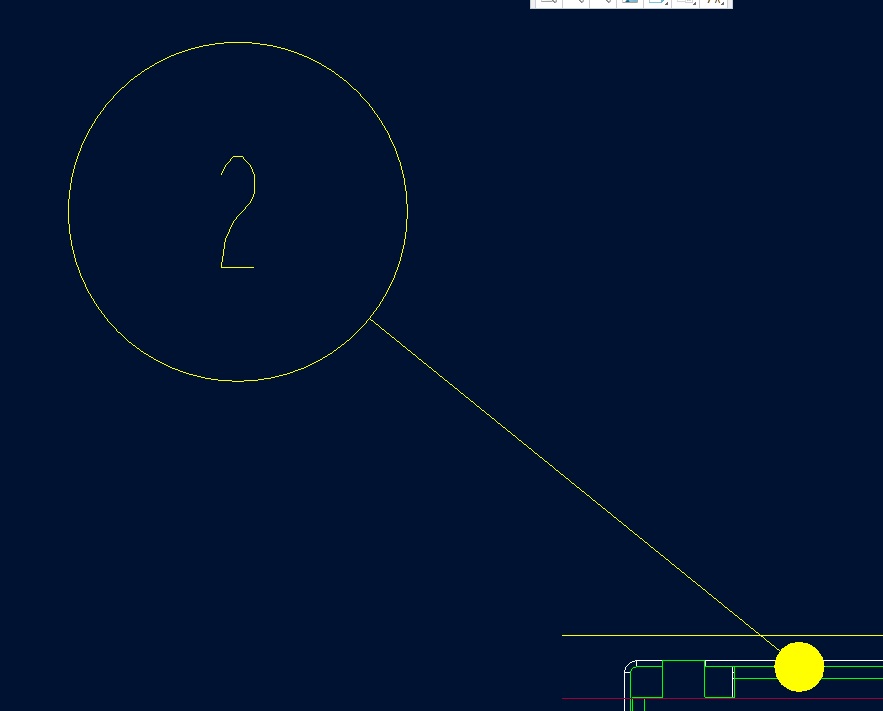
i want to change baloon style? it is posible ? be a parameter name in config .pro?

the point is too bigger how i scale or minimize

be in creo a scalling factor for this point?
1.jpg

tks


This thread is inactive and closed by the PTC Community Management Team. If you would like to provide a reply and re-open this thread, please notify the moderator and reference the thread. You may also use "Start a topic" button to ask a new question. Please be sure to include what version of the PTC product you are using so another community member knowledgeable about your version may be able to assist.
Best answer by dcox-2

There are a couple of variables in File→Prepare→Drawing Properties→Detail Options that should help you.

Under "These options control leaders", draw_dot_diameter will let you change the size of the filled dot.

Under "These options control tables, repeat regions and BOM balloons", def_bom_balloons_edge_att_sym lets you change the dot to another shape if you want.

Under "Miscellaneous options", max_balloon_radius and min_balloon_radius allow you to change the size of the balloon.

I hope this helps,
David

1 reply

dcox-21-VisitorAnswer
1-Visitor
May 13, 2015

There are a couple of variables in File→Prepare→Drawing Properties→Detail Options that should help you.

Under "These options control leaders", draw_dot_diameter will let you change the size of the filled dot.

Under "These options control tables, repeat regions and BOM balloons", def_bom_balloons_edge_att_sym lets you change the dot to another shape if you want.

Under "Miscellaneous options", max_balloon_radius and min_balloon_radius allow you to change the size of the balloon.

I hope this helps,
David