
1-Visitor
January 20, 2016
Solved

Can't start PTC Creo 3.0

  • January 20, 2016
  • 3 replies
  • 6657 views

Hello PTC Community, I'm in need of some help.


In our company we were using PTC Creo 2.0 but we accually had a license file for 3.0.. 

I downloaded PTC Creo 3.0 (MED-100WIN-CD-400_M070_Win64.zip) and installed it. Everything works great untill I tried running Creo. I get the same error when running Simulate.


I get following error:
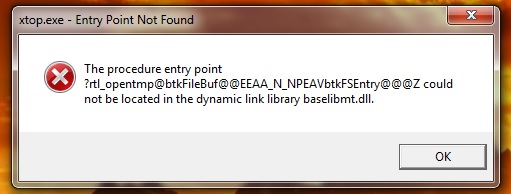
error.jpg


I tried uninstalled and reinstalling it multiple times. Nothing I've done so far seems to help.


I really appreciate any help anybody can provide.

Best answer by tlemaire

These two sentences basicly solved it:

- It seems to me that when you launch CR3, it finds wrong baselibmt.dll file (maybe file that belongs to CR2).
- On my PC C:\Windows\System32 does not contain baselibmt.dll file.

I sorted my System32 folder on date and time. I noticed i had a bunch of other DLL files (128 to exact) created on that date. I moved them all out.. Tried openening Creo 3.0 and it works..

SUCCES!
Thanks ALOT for the help.

3 replies

23-Emerald III
January 20, 2016

Are you running a 64-bit OS?

Properties on your Computer icon will give this:

tlemaire1-VisitorAuthor
1-Visitor
January 20, 2016

Yes

yes.jpg

24-Ruby III
January 20, 2016

Hi,

did you unzip MED-100WIN-CD-400_M070_Win64.zip and then launch setup.exe ? I use free 7-zip 9.20 software to unzip downloaded files.

MH

tlemaire1-VisitorAuthor
1-Visitor
January 20, 2016

Yes, I unzipped the file (also with 7-Zip 9.20) before running the setup.exe (as administrator).

I stored the unzipped files in "C:\Temp".

24-Ruby III
January 21, 2016

Hi,

I searched baselibmt.dll file on my local disk. I found this file in CR2+CR3 installation and unzipped DVD media.

It seems to me that when you launch CR3, it finds wrong baselibmt.dll file (maybe file that belongs to CR2).

  • search you local disk for baselibmt.dll file
  • check PATH variable

MH

tlemaire1-VisitorAuthor
1-Visitor
January 21, 2016

I found it in CR2, CR3, System32.


Path file:

C:\Program Files\PTC\Creo 3.0\Parametric\bin;
C:\PROGRA~1\PTC\MKSTOO~1\bin64;

C:\PROGRA~1\PTC\MKSTOO~1\bin;

C:\PROGRA~1\PTC\MKSTOO~1\bin\X11;

C:\PROGRA~1\PTC\MKSTOO~1\mksnt;

C:\Program Files\Common Files\Microsoft Shared\Windows Live;

C:\Program Files (x86)\Common Files\Microsoft Shared\Windows Live;

C:\ProgramData\Oracle\Java\javapath;

%SystemRoot%\system32;

%SystemRoot%;

%SystemRoot%\System32\Wbem;

%SYSTEMROOT%\System32\WindowsPowerShell\v1.0\;

C:\Program Files (x86)\Windows Live\Shared;

C:\Program Files\PTC\Creo 3.0\Parametric\bin;

C:\Program Files (x86)\Skype\Phone\

24-Ruby III
January 21, 2016

Hi,

on my PC C:\Windows\System32 does not contain baselibmt.dll file. Go to C:\Windows\System32 directory, rename baselibmt.dll file and test CR3.

MH