
1-Visitor
March 28, 2012
Solved

Config option for keeping browser closed

  • March 28, 2012
  • 4 replies
  • 1908 views

I know that I've seen this option somewhere but I can't seem to find it now.

It allows you to set opening the PTC browser upon open to no. Anyone remember what the command is? Thanks so much!


This thread is inactive and closed by the PTC Community Management Team. If you would like to provide a reply and re-open this thread, please notify the moderator and reference the thread. You may also use "Start a topic" button to ask a new question. Please be sure to include what version of the PTC product you are using so another community member knowledgeable about your version may be able to assist.
Best answer by David_M

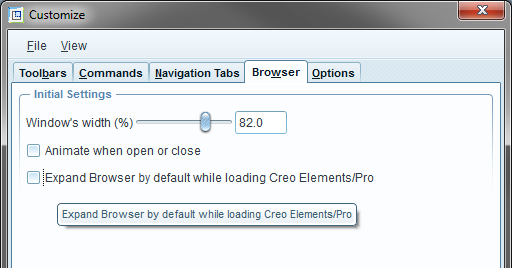
Actually, I was wrong there. That option hides the 3D model space tab. The correct answer is in Tools > Customize Screen > Browser, then uncheck "Expand Browser by default..."

Untitled.png

4 replies

1-Visitor
March 28, 2012

enable_3dmodelspace_broswer_tab no

KrisR1-VisitorAuthor
1-Visitor
March 28, 2012

Thanks! Have a great day!

David_M1-VisitorAnswer
1-Visitor
April 3, 2012

Actually, I was wrong there. That option hides the 3D model space tab. The correct answer is in Tools > Customize Screen > Browser, then uncheck "Expand Browser by default..."

Untitled.png