
1-Visitor
April 3, 2021
Question

config.pro changes are not working.

  • April 3, 2021
  • 2 replies
  • 11427 views

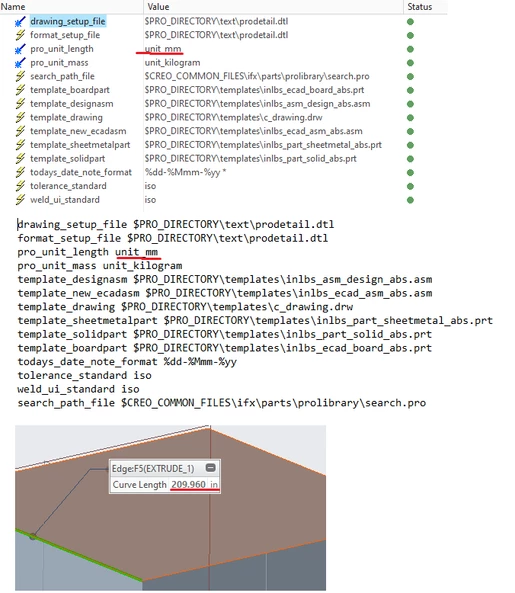
I just installed the latest version of creo and changed the config.pro file at creo>Common Files>text to all the metric. When I open the configuration editor is says its in metric.


But when I open a new part it's imperial by default, why isn't it listening to the config file?
 

TO_9427368_0-1617463865653.png


2 replies

tbraxton
22-Sapphire II
22-Sapphire II
April 3, 2021

If you are using a template to create new files, look at the template and see if the units are metric. The units are stored with parts, .asm etc. so that may be the cause of this.

KenFarley
21-Topaz II
April 5, 2021

You can see in the rest of the config file that the models being pointed to as templates all have the telltale "inlbs" in their names, so it looks like your suspicions are correct.

24-Ruby III
April 7, 2021

@TO_9427368 wrote:

I just installed the latest version of creo and changed the config.pro file at creo>Common Files>text to all the metric. When I open the configuration editor is says its in metric.


But when I open a new part it's imperial by default, why isn't it listening to the config file?


TO_9427368_0-1617463865653.png


Hi,

config.pro option works as expected only in case that you create empty part. You do not have to use template!