
1-Visitor
November 24, 2017
Solved

CONFIG SETTINGS

  • November 24, 2017
  • 3 replies
  • 2353 views

Hi, there.


I'm a new user of Creo 3.0 and I have a problem with it.


I'd like to get rid of a spline of section view.(It's blue color)


I guess I can do something on cofiguration option but I don't know what I should do exactly.


What is the exact name of that option or any other way to solve this problem.


Happy holidays to all of you.


↓ That blue edge line of the photo.
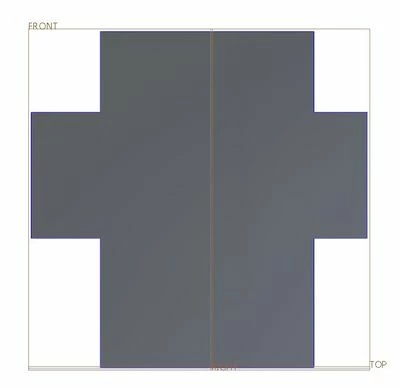
Blue Line.JPG

Best answer by MartinHanak

Hi,


if you activate x-section then Creo removes some model material and displays section outline and hatching. You can turn off hatching, only. Section outline is always visible. To get model without the outline, you have to cut model material using solid feature.

3 replies

Mahesh_Sharma
22-Sapphire I
November 24, 2017

Can you share the part? 


If blue line you are referring is a sketch, you may hide that. But need to review part geometry first. 

24-Ruby III
November 24, 2017

Hi,


if you activate x-section then Creo removes some model material and displays section outline and hatching. You can turn off hatching, only. Section outline is always visible. To get model without the outline, you have to cut model material using solid feature.

Seonjeong1-VisitorAuthor
1-Visitor
November 28, 2017

Martin Hanak.


Section outline is always visible..


I saw my ex-co worker made a section view without that blue line


and I thought I could remove it.


He might extrude the model like you said.


Solved!


Thank you, Martin Hanak.

18-Opal
November 27, 2017

If the blue line is a sketch, then as the previous person noted, you can hide it.  But it would be helpful to look at the model.


Thanks,

Amit