1-Visitor
December 2, 2014
Solved

Constrain a slider

  • December 2, 2014
  • 3 replies
  • 2939 views

Hello,

I want to create something like a scissor table. But we don’t have the “Mechanism” license. Is there an alternative way to accomplish a simulation?

Stefan
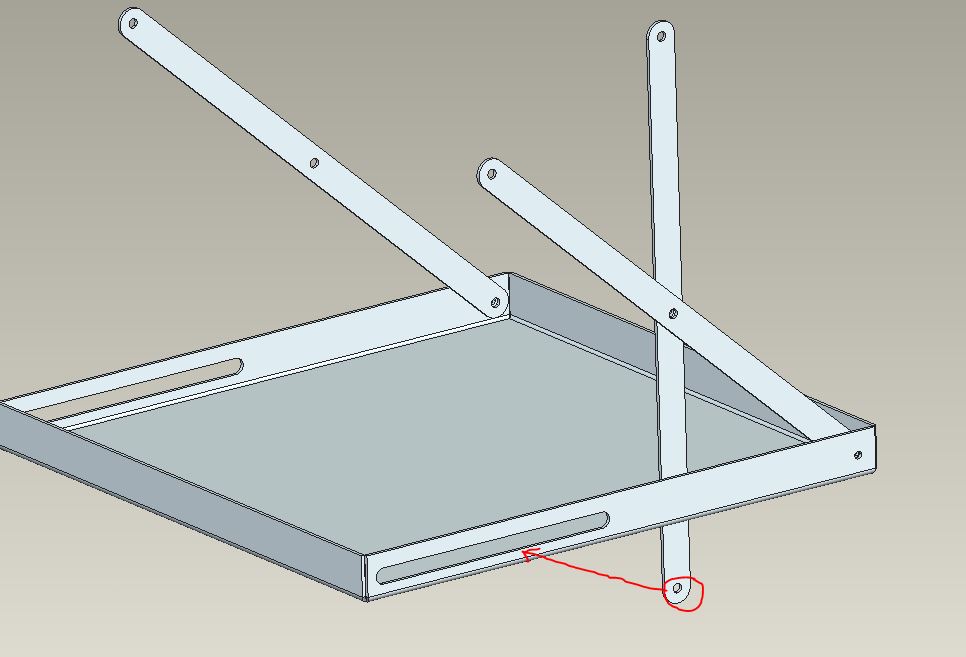
Scissor_table.JPG

Best answer by TomU

You might want to double check that. Mechanism (kinematics, aka "lite") comes as part of the base seat of Creo. Mechanism Dynamics (for springs, forces, etc.) is an additional license.

3 replies

24-Ruby III
December 2, 2014

Stefan,

you have to create movable axis (its position is defined by dimension) located in the slot and use it as assembly reference for marked component.

When you modify dimension and regenerate, you will receive different position of the component.

Martin Hanak

TomU23-Emerald IVAnswer
23-Emerald IV
December 2, 2014

You might want to double check that. Mechanism (kinematics, aka "lite") comes as part of the base seat of Creo. Mechanism Dynamics (for springs, forces, etc.) is an additional license.

17-Peridot
December 2, 2014

You have to remember to install the license at the time you install Creo. I made that error the 1st time around too.

17-Peridot
December 2, 2014

You can constrain a point to a line. This gives it a linear degree of freedom. Just add a datum point to the link and a sketch with a line, or datum curve, to the base in the slot where you intend the mate to be.

