

13-Aquamarine
June 7, 2024
Solved

Creating Creo Start Parts - Parameters in New File Options Dialog

  • June 7, 2024
  • 1 reply
  • 1715 views

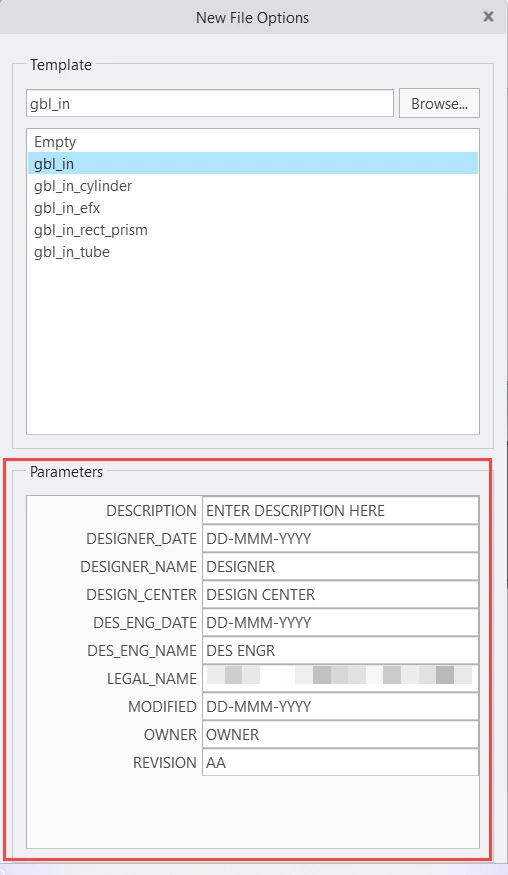
I am in the process of creating new Creo Parametric start parts and have a question. When these parts are used, when creating a new part, the New  File Options dialog displays some parameters, but doesn't include all the parameters in the start part. 


What I am trying to figure out is how to determine which parameters are displayed and which ones are not. In the attachment, only about 25% of the total parameters are being displayed. My goal is to limit which parameters are shown and what order they are displayed in. 


I am using Creo Parametric 8.0.1.0
 

Phillip1_0-1717778600417.png


Best answer by BenLoosli

I am guessing that you are using Windchill with Creo. Those are the parameters that you have designated in Creo to be uploaded to Windchill.

As we use ModelCheck, too, we have a bunch of MC parameters that get uploaded to Windchill and show up in the list of parameters. Since we only have a single start_part file and 'use default template' is checked, the parameters don't show up for our users.

1 reply

BenLoosli23-Emerald IIIAnswer
23-Emerald III
June 7, 2024

I am guessing that you are using Windchill with Creo. Those are the parameters that you have designated in Creo to be uploaded to Windchill.

As we use ModelCheck, too, we have a bunch of MC parameters that get uploaded to Windchill and show up in the list of parameters. Since we only have a single start_part file and 'use default template' is checked, the parameters don't show up for our users.

Phillip113-AquamarineAuthor
13-Aquamarine
June 7, 2024

Thank you for the quick response. I didn't realize the designated parameters controls that. Kudos!!