


21-Topaz I
January 12, 2026
Solved

Creo 12 internal browser not working

  • January 12, 2026
  • 1 reply
  • 125 views

I have installed Creo 12 successfully on 2 machines but on one of the machines I get the errors below and the browser fails to work. Presumably the errors below is because the browser is not working.
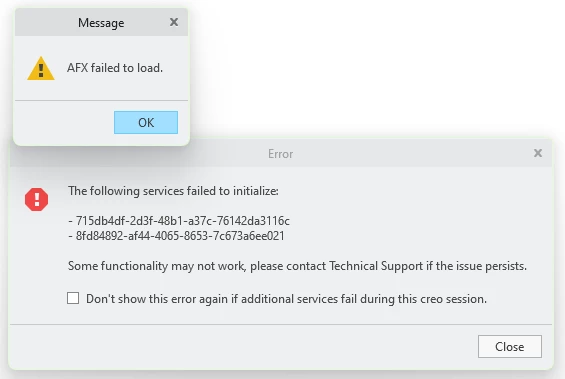
image.png


Things I have tried already:

  1. Removed all config / UI files (Vanilla install)
  2. Reinstalled using an install script that worked on the same hardware
  3. Deleted the Creo Agent and Platform folders and replaced with folders from a known working install
  4. Performed a Windows Control Panel > Apps >PTC Creo 12 Platform Services > Modify > Repair

I have Creo 9.0.9.0, Creo 12.4.0.0 and Creo 12.4.2.0 installed. Creo 12.4.2 works fine as far as I can tell other than the internal browser not working, but I do need it to be working.


Any other suggestions? This happened one other time and I had to reimage which I am really trying to avoid.


Best answer by remy

the following two articles :

https://www.ptc.com/en/support/article/CS439480?source=search

https://www.ptc.com/en/support/article/CS340693?source=search

suggest there is something to do with access and admin rights


1 reply

remy21-Topaz IAnswer
21-Topaz I
January 13, 2026

the following two articles :

https://www.ptc.com/en/support/article/CS439480?source=search

https://www.ptc.com/en/support/article/CS340693?source=search

suggest there is something to do with access and admin rights


Chris321-Topaz IAuthor
21-Topaz I
January 13, 2026

Installing locally as admin fixed the issue

21-Topaz II
January 13, 2026

In the past with I think version 4.0, whenever I installed a new release I would always have to start up Creo while still logged in as admin Otherwise, Creo wouldn't actually "finish" the installation. It seemed to always need to do some sort of "first time running" stuff to get things completely configured.