

15-Moonstone
February 22, 2013
Question

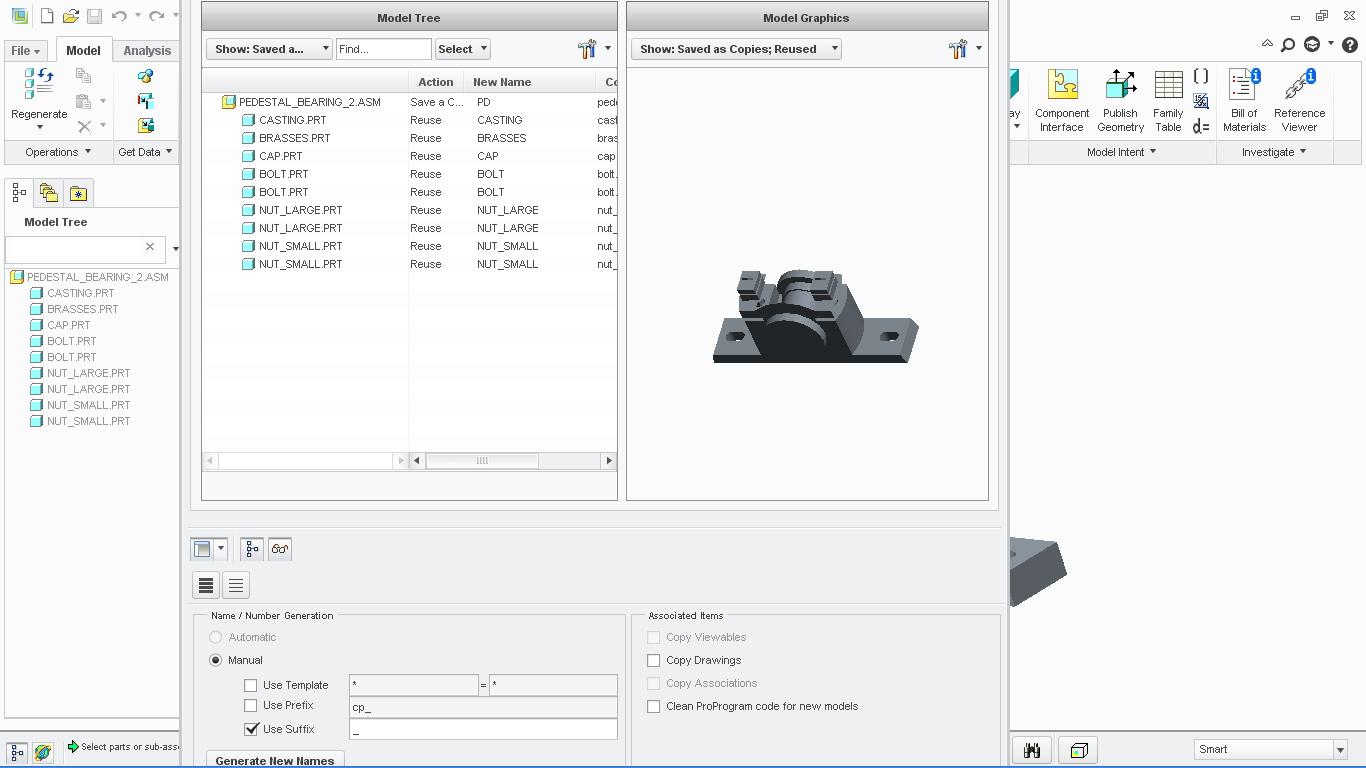
creo 2.0 m030 assembly save a copy window

  • February 22, 2013
  • 5 replies
  • 2112 views

while saving a copy of assembly, this the window which opens....difficult to move..and some options are gone right below..not to be seen...creo 2.0 M030
assembly+copy+creo+2.JPG


This thread is inactive and closed by the PTC Community Management Team. If you would like to provide a reply and re-open this thread, please notify the moderator and reference the thread. You may also use "Start a topic" button to ask a new question. Please be sure to include what version of the PTC product you are using so another community member knowledgeable about your version may be able to assist.

5 replies

1-Visitor
February 25, 2013

I have faced the same problem. I couldnt find any solution. Luckily my monitor is replaced with larger screen and using with smaller icons, so i can see the full window.

15-Moonstone
February 25, 2013

there will be a solution only when the PTC guys take a look at it..but i do not know when? this is frustrating....

1-Visitor
March 7, 2013

On some computers it is possible to define a larger working area. It's a setting somewhere in the graphic controller properties screen.

This way you can for example define a working area of 1920x1080pixels on a screen with maximum resolution of 1024x800

Moving your mouse to the side of your monitor will cause the working area to slide further.

I'm not saying this is the perfect solution, but possible a quick and dirty one to solve your problem until PTC comes with a better one.

1-Visitor
June 11, 2013

I had this issue too. PTC wasn't much help. What I did was to log off, and go to control panel and set font to smallest. Then go back into Creo and you should be able to see the whole window.

Hope this helps

12-Amethyst
June 11, 2013

Gentlemen,

this was answered in another thread : fix is coming in M070

http://communities.ptc.com/message/205159#205159