
1-Visitor
December 20, 2014
Solved

Creo 2.0 RESTARTING my computer once I open a file!

  • December 20, 2014
  • 2 replies
  • 5524 views

Computer Info: HP ENVY 360xt touch/ i5 dual core/ 8gb RAM/ intel 4400 graphics/ windows 8.1/ 15.6" display/ 1366x768

I suspect the problem has to do with the second display I just recently added because Creo 2.0 worked perfectly well before I installed my second display screen by AOC.

Screen Info: AOC E1659Fwu/ 15.6" display/ 1366x768/ USB 3.0 connected using displaylink

WHAT HAPPENS IS... with screen connected or disconnected once I get to opening up a file in creo my screen goes black and suddenly my computer is restarting. After the restart my second display starts flashing and glitching out, but once I shutdown unplug and replug my screen goes back to normal. Still no luck with Creo 2.0 restarting my computer though. Even if my screen isn't connected it will restart, so I think that points to the software that runs the screen which is called DisplayLink, but I don't know what to do with that being said.

- Jared Sand
    Best answer by TomD.inPDX

    So far, so good.

    Now create a file named config.pro (a normal simple text file without the .txt extension)

    ...and create a line int he file "graphics win32_gdi"

    This config.pro file belongs in the startup folder.

    In case you have trouble with that (since windows likes to hide common extensions)...

    I have attached the file as well.

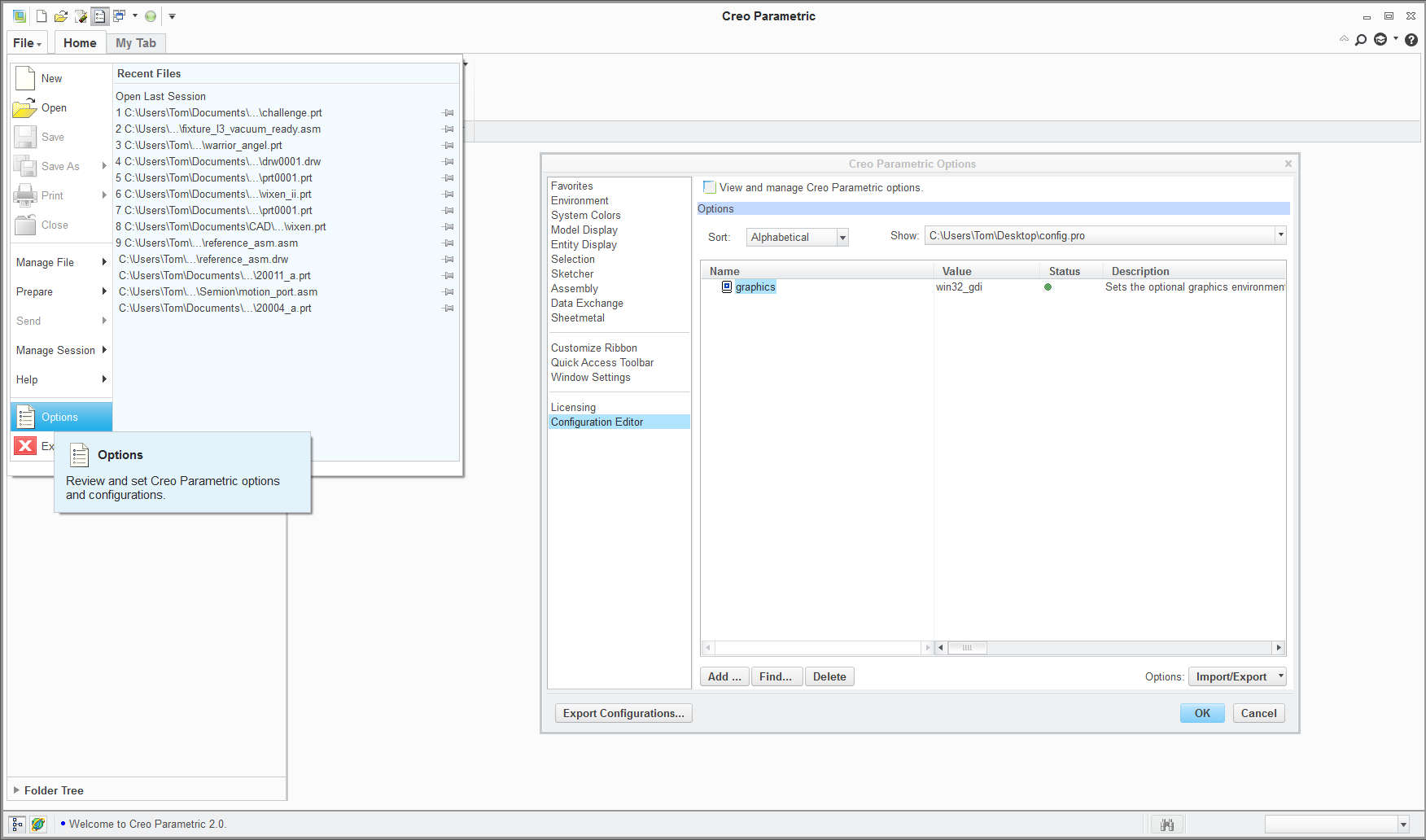
    Start Creo from the shortcut and confirm the setting is enabled:

    confirm.png

    If this still works to this stage, then you can try re-enabling the multiple screen application.

    2 replies

    17-Peridot
    December 20, 2014

    Welcome to the forum, Jared.

    Creo is very dependent on the graphics driver and as such, it could well be that activating the second screen may have changed something. However, rebooting is not one of the habits of Creo. It normally just hard crashes without affecting Windows.

    You might want to get yourself back to where Creo worked with the single screen. Creo has a requirement of having at least 1024 vertical lines IIRC. Not sure if this can cause conflicts this extreme.

    You could try changing the driver setting to "graphics win32_gdi" in config,.pro to see if this helps.

    It may also be that there are issues with displaylink and when the primary monitor turns off, Windows thinks you went into sleep mode, or somesuch nonsense. I've always found it frustrating to get these tools working reliably.

    If you still have maintenance, you could submit a support case. If this is an academic version, you can also log a support case here http://www.ptc.com/communities/academic-program/technical-support

    1-Visitor
    December 20, 2014

    Thank You,

    *** "You could try changing the driver setting to "graphics win32_gdi" in config,.pro to see if this helps." ***

    How would I go about doing this?

    - Jared Sand

    17-Peridot
    December 20, 2014

    It depends on how your system is currently reading the configuration file.

    If you created a config.pro file and it resides in a custom location, you can edit this file with a text editor.

    You would add a line "graphics win32_gdi"

    This config.pro file is read from the folder your Creo shortcut points to. You can see where this is when you right-click the Creo shortcut and select Properties. Start-in is in the shortcut tab.

    If you are creating a new config.pro file, be sure the file doesn't get a hidden .txt extension added.

    1-Visitor
    December 28, 2014

    Yes!

    I took the file you attached, unzipped it and moved it to the "start in" location and I can now successfully open a file without Creo crashing and restarting on me.

    Thank you for your persistence in helping me make this work it is very appreciated.

    - Jared Sand

    17-Peridot
    December 28, 2014

    We love happy endings