
1-Visitor
July 7, 2016
Solved

Creo 3.0 - access to older version 2.0

  • July 7, 2016
  • 4 replies
  • 5678 views

Hello,


We just bought Creo 3.0 and our client is using Creo 2.0.  Since there is no way to save in 2.0 format from 3.0, can we gain access to the older 2.0 version so we can send files back and forth?


This thread is inactive and closed by the PTC Community Management Team. If you would like to provide a reply and re-open this thread, please notify the moderator and reference the thread. You may also use "Start a topic" button to ask a new question. Please be sure to include what version of the PTC product you are using so another community member knowledgeable about your version may be able to assist.
Best answer by MartinHanak

Hi,

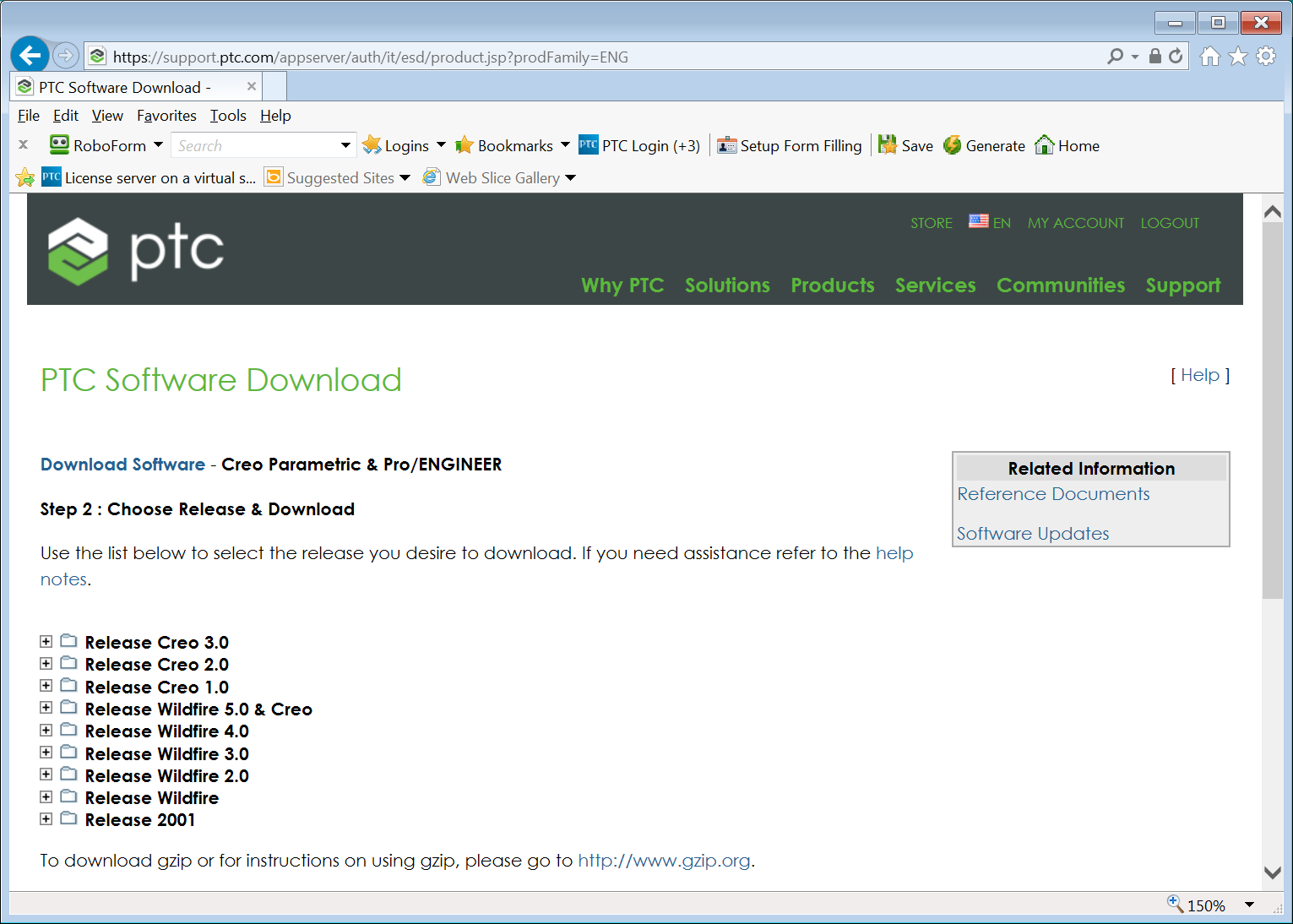
go to https://support.ptc.com/appserver/auth/it/esd/product.jsp?prodFamily=ENG

and log in to PTC Support.

You will see following page:

download.png

MH

4 replies

Dale_Rosema
23-Emerald III
23-Emerald III
July 7, 2016

You can open older versions with Creo 3.0, but there is some software that you need for them to open it back in Creo 2.0.

You could always download and install the version they are using if you are on maintenance. Then you can share as much as you like. You just have to make sure you open/save their files in the same version. (Maybe different folders in you network.) A lot of engineering services companies have to do this so that they are working on the same version as their clients.

nmiller-31-VisitorAuthor
1-Visitor
July 7, 2016

How do we download and install the older version?

Dale_Rosema
23-Emerald III
23-Emerald III
July 7, 2016

Nancy Miller

Check out this thread:

Finding PTC Download Link

Mahesh_Sharma
22-Sapphire I
July 7, 2016

Nancy,

You can download and install Creo 2.0 and the current license (For Creo 3.0) is downward compatible hence same license file or server can use for Creo 2.0

nmiller-31-VisitorAuthor
1-Visitor
July 7, 2016

Mahesh,

Great, how exactly do I download the Creo 2.0 install files?

23-Emerald III
July 7, 2016

Log in to PTC.com support and go to the software download page.

https://support.ptc.com/appserver/cs/software_update/swupdate.jsp

15-Moonstone
July 8, 2016

Hi..

you can open and save creo3.0 data in creo2.0, For that you need to copy readnewermodels.dll  from "C:\Programme Files\Creo 3.0\M090\Common Files\x86e_win64\gcri"  ( your creo 3.0 installation folder ) to "C:\PTC\Creo 2.0\Common Files\M080\x86e_win64\obj" ( your creo 2.0 installation folder).

or you may share your creo3.0 readnewermodels.dll to your client.

Thanks,

Prashant Pandarkra

Mahesh_Sharma
22-Sapphire I
July 13, 2016

Nancy,

Did you get the answer of your query? If yes, please mark appropriate reply to post as correct answer.

nmiller-31-VisitorAuthor
1-Visitor
July 14, 2016

Yes I got the answer, Thank you MartinHanak!