
13-Aquamarine
April 1, 2017
Solved

CREO 3.0 -- how to get rid of version control?

  • April 1, 2017
  • 2 replies
  • 3631 views

Hello all,

Is there an option in config.pro to disable version control in CREO? Or a setting in Options?

Whenever I try to open a part that has the same name with another part in a different location, CREO 3.0 prevents me from doing that. The only way to get around it is to shut down CREO and start again, which is extremely annoying and time consuming. The error I get is in the picture below.

Thank you, Colin.
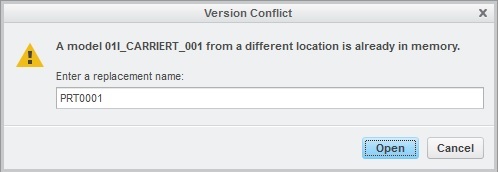
Error.Version.Conflict_02.jpg

Best answer by StephenW

This is no version control in Creo. This is a model you have "in memory" and you are trying to open the same model.

You can erase the part from memory by using the ERASE NOT DISPLAYED command under FILE - MANAGE SESSION or if you have the part open, you can use the ERASE CURRENT in the same location.

2 replies

StephenW23-Emerald IIIAnswer
23-Emerald III
April 3, 2017

This is no version control in Creo. This is a model you have "in memory" and you are trying to open the same model.

You can erase the part from memory by using the ERASE NOT DISPLAYED command under FILE - MANAGE SESSION or if you have the part open, you can use the ERASE CURRENT in the same location.

13-Aquamarine
April 4, 2017

This it it, it works, thank you very much!!!

23-Emerald III
April 3, 2017

Why are you:

1) Trying to open an already open part? Switch part will get you to that part.

2) Why do you have the same part in multiple locations? This will only lead to confusion as to which is the latest.

I am guessing you do not use a PDM system since a PDM would not allow to have the same part file in multiple locations.
