
1-Visitor
March 13, 2021
Question

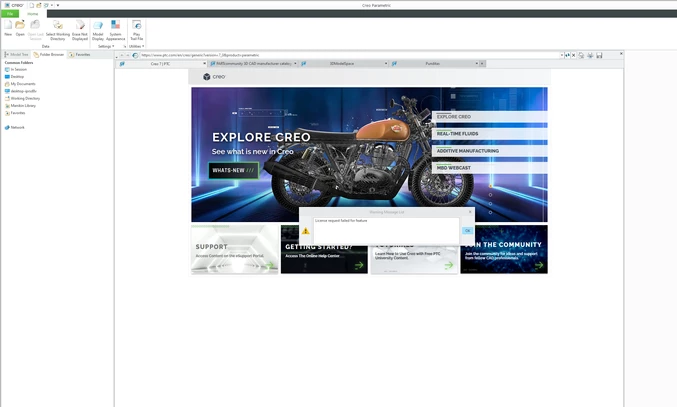
Creo 7.0.2.0 student version error "License request failed for feature"

  • March 13, 2021
  • 1 reply
  • 9448 views

I currently have Creo 7.0.2.0 installed. When trying to run Creo I'll get this error "License request failed for feature" (See image below for reference). Has anyone else had this issue? I have Creo 7.0.0.0 installed before but uninstalled it then reinstalled the new version. If someone could help me resolve this issue that would be great. Please let me know if you need more information. 
 

Creo Error.png


1 reply

24-Ruby III
March 15, 2021

@LS_9840919 wrote:

I currently have Creo 7.0.2.0 installed. When trying to run Creo I'll get this error "License request failed for feature" (See image below for reference). Has anyone else had this issue? I have Creo 7.0.0.0 installed before but uninstalled it then reinstalled the new version. If someone could help me resolve this issue that would be great. Please let me know if you need more information. 


Creo Error.png


Hi,

you used Creo 7.0.0.0 ... therefore license file can be still located in C:\ProgramData\PTC\Licensing directory (or saved with email sent to you in the past).

You can use this file to install Creo 7.0.2.0. You can modify parametric.psf file in your installation ... see https://community.ptc.com/t5/PTC-Academic-Program-Discussions/Creo-7-0-License-Troubles/m-p/717099#M12144 discussion.


1-Visitor
March 16, 2021

Hi Martin,


I followed the steps that you mention on the other post and I'm getting this error now, would you happen to know what I should do to fix this issue? see images below for reference. 


Creo Error 2.png


Creo Error 3.png

24-Ruby III
March 16, 2021

@LS_9840919 wrote:

Hi Martin,


I followed the steps that you mention on the other post and I'm getting this error now, would you happen to know what I should do to fix this issue? see images below for reference. 


Creo Error 2.png


Creo Error 3.png


Hi,

1st problem ... modify properties of shortcut used to start Creo ... put C:\Users\Public\Documents path into Start in field.

2nd problem ... parametric.psf does not contain valid information for PTC_D_LICENSE_FILE and CREOPMA_FEATURE_NAME ... please read https://community.ptc.com/t5/PTC-Academic-Program-Discussions/Creo-7-0-License-Troubles/m-p/717099#M12144 once again.