

17-Peridot
July 26, 2023
Solved

Creo 8.0.6.0 crashes on model open

  • July 26, 2023
  • 2 replies
  • 4702 views

I have a Creo assembly (saved as from another assembly) that, when I go to open in Creo, crashes the session. 

I provided PTC Tech Support with the assembly and they can't replicate the crash - i.e. it opens fine on their end. It doesn't open on any of the systems we have.


I can only open the model if I select "Open Subset" and then activate the Master Rep from within there. But if I forget and from Windchill select "Open In Creo", it crashes Creo. The same crash happens if I export the files to the C:\ drive and open from there so it isn't Windchill related. 


Creo writes a handful of files in addition to the traceback.log to the start directory. And it's been writing a Creo file in there that doesn't open in Creo ("Cannot retrieve file" says the error when I tried). 
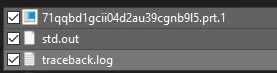
Dobi_0-1690411237021.png

That Creo file is explicitly called out in the std.out file:
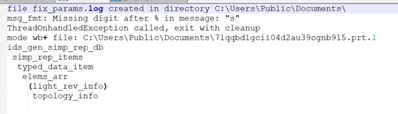
Dobi_1-1690411267651.png

Is there a way to find out what the file is in real life? Does anyone have any other troubleshooting exercises or codes to decipher the traceback.log or std.out files? 


Does the process ID in the traceback.log match up to a process ID of a particular service that I can trace back to ?
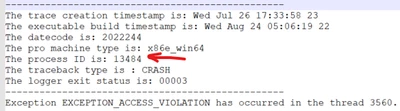
Dobi_2-1690411408318.png


I thought this was related to some circular references that existed but at this point all of them are resolved and the file still crashes. 


Any help is much appreciated!

Best answer by Dobi

PTC tech support reviewed this and the fix was to add the following line in the config.pro:


retrieve_display foreground


Not sure what the underlying issue ultimately was but that line fixed the crashing. 

Without that, the workaround was to open subset in Creo, and then activate the correct representation. 

2 replies

Dobi17-PeridotAuthor
17-Peridot
July 27, 2023

I was able to sort out the Creo file and it's a flexible component 2 levels down from the top level. It also has a User Defined simplified rep. 

This file is used in many assemblies but it only crashes this particular one... 

Does anyone know what the ids_gen_simp_rep_db points to? I'm guessing it's got something to do with the representations.

14-Alexandrite
August 3, 2023

If PTC isn't able to reproduce it with the same exported file, try it without your config.pro, config.sup, startup script, etc.  You could also try with the config setting "graphics" = "win32_gdi" to disable the graphics card.  If it is a graphics issue, updating the driver may help.

Dobi17-PeridotAuthor
17-Peridot
August 3, 2023

Tried all that but still no luck on my end. 

I followed the trail of std.out files to essentially narrow it down to flexible models and/or harness features. I made a copy of the model and started just taking out those bits until I got to a working assembly but that doesn't help since we need those other assemblies in there. 


And the model itself is a save as from back a few models ago but only the last 2 in the history of save-as have this crashing issue. 

Dobi17-PeridotAuthorAnswer
17-Peridot
September 11, 2023

PTC tech support reviewed this and the fix was to add the following line in the config.pro:


retrieve_display foreground


Not sure what the underlying issue ultimately was but that line fixed the crashing. 

Without that, the workaround was to open subset in Creo, and then activate the correct representation. 

23-Emerald III
September 11, 2023

Thanks for posting the solution. I think I have experienced this in the past. Hopefully I'll remember this next time it happens!