

1-Visitor
December 3, 2015
Solved

Creo Config

  • December 3, 2015
  • 2 replies
  • 1282 views

Can anyone advise me of the config to turn off dimensions showing in the model as upper and lower limits:-
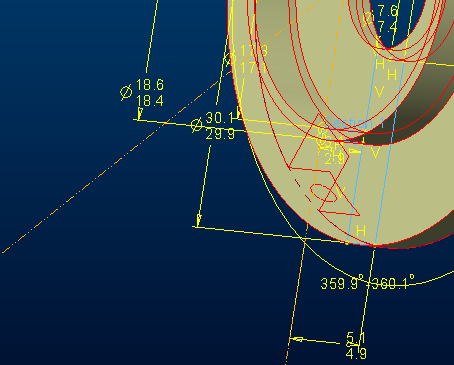
Not sure why this has just started happening, the only change I have made to my config was the changes to get rid of the normal mate constrain in assembly mode


This thread is inactive and closed by the PTC Community Management Team. If you would like to provide a reply and re-open this thread, please notify the moderator and reference the thread. You may also use "Start a topic" button to ask a new question. Please be sure to include what version of the PTC product you are using so another community member knowledgeable about your version may be able to assist.
Best answer by sghongade-2

hi colin,

Go To the options menu and then select configuration editor in configuration Editor search tol_display select the value to No if it is Yes.

another method is you can select the dimension and Right click on it then set the tolerance  type to Normal.

2 replies

1-Visitor
December 3, 2015

hi colin,

Go To the options menu and then select configuration editor in configuration Editor search tol_display select the value to No if it is Yes.

another method is you can select the dimension and Right click on it then set the tolerance  type to Normal.

24-Ruby III
December 3, 2015

Hi,

set config.pro option tol_display no

MH