
1-Visitor
April 3, 2014
Question

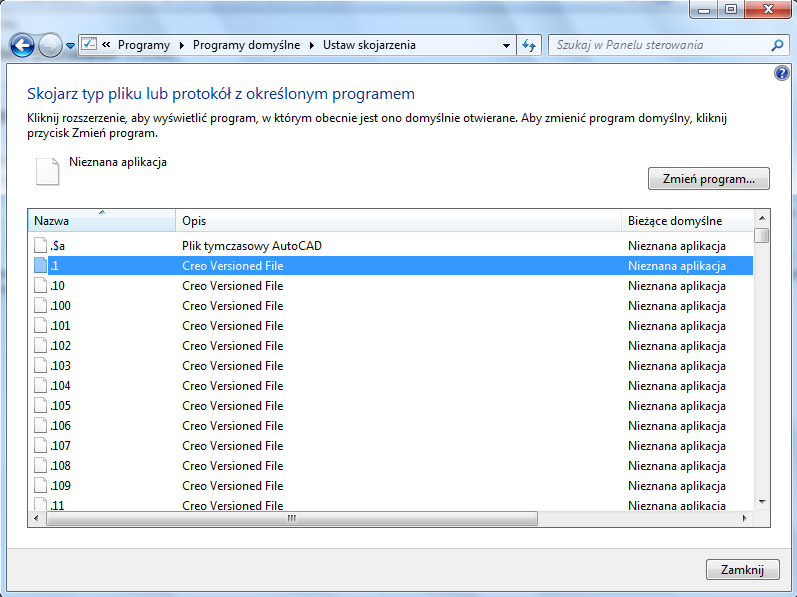
creo creates new file extensions like .1 .12 .100 etc

  • April 3, 2014
  • 3 replies
  • 5676 views

I have a problem with odd extensions from Creo 2.0. It made them automaticly. I hadn't perceived it before. However I created video file - the name of it was the date "11.03.14". System considered ".14" as extension of file. How to turn these extensions off?
rozszerzenia.png

    3 replies

    Dale_Rosema
    23-Emerald III
    23-Emerald III
    April 3, 2014

    AW67,

    Welcome to the forum. Creo/WF have always created the .1, .12, .100 extensions to the parts and assemblies everytime you save them. They are called versions. They index everytime you save a part/assembly. You may have had them hidden before, but they have been there.

    The usefull thing about them is that if you have been working on a part and something didn't work out, you can go back to an ealier version.

    They do tend to take up space, hence you see the discussions about purge them periodically.


    Thanks, Dale

    AW671-VisitorAuthor
    1-Visitor
    April 3, 2014

    Thank you for your answer. Of course I knew that Creo saves everytime in new file. I didn't know it creates such files. I found soultion for my destination. Just changed file name for "11.03.14.mp4" and it`s ok now.

    1-Visitor
    April 3, 2014

    There are two ways, but similar result.

    In one, you select the file and choose "Open With..." and pick the application you want and check the box "Always open with..." or whatever.

    In the other you hunt down the association in the Registry and remove it.

    The downside is that double clicking the file won't open Pro/E Creo whatever, based on the extension, but since I never do that, it's not a loss.

    PTC stakes out .1 to .400 or so. Correction - from .1 to .999, in WF5.

    14-Alexandrite
    April 3, 2014

    And Windows doesn't really like periods in names. Most people do things like 11-03-14.mp4 or 11_03_14.mp4

    Dale_Rosema
    23-Emerald III
    23-Emerald III
    August 5, 2015

    It looks like you can turn the iterations off in Creo 3 per Martin's comment:

    Move version numbers to before the files extension