Creo eval/training license issue
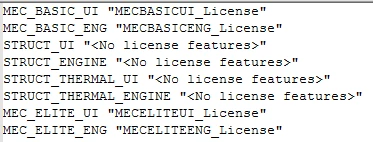
I installed Creo Parametric as a trial. I have since received a training license, and have installed the license manager and applied the license. I reconfigured Creo to use 7788@caeepc003, which is the hostname of the machine where the license is installed. When I try to use the simulation functionality, I get the following message.
There are some analysis/design studies in the model that require Basic Creo Simulate license. Please contact your sales representative.
If I run ptcstatus I get the following.
C:\Program Files\PTC\FLEXnet Admin License Server>bin\ptcstatus.bat
Displaying status for license file: C:\Program Files\PTC\FLEXnet Admin License Server\bin\..\licensing\license.dat
License Server is UP: C:\Program Files\PTC\FLEXnet Admin License Server\bin\..\licensing\license.dat
ptc_d FLEXnet Publisher version: 11.17
License In Use Free
------- ------ ----
PROE_DesignEssH Uncounted, Locked
PROE_DesignEssH Uncounted, Locked
MECELITEENG_License Uncounted, Locked
MECELITEENG_License Uncounted, Locked
MECELITEENG_License 0 1
MECELITEUI_License Uncounted, Locked
MECELITEUI_License Uncounted, Locked
MECELITEUI_License 0 1
PROE_DesignEss 0 1
MECBASICENG_License 0 1
MECBASICUI_License 0 1
CREOSCHEM_Lite 0 1
* = License Extensions - Available only on startup.
^ = Borrowed License.
Press any key to continue . . .
Looks to me like the eval license is still in place and Creo is using it instead of the license installed under the license manager.
License web interface shows
Feature Version In Use (Available) Expiration
CREOSCHEM_Lite 40.0 0 (1) 2023-03-14
MECBASICENG_License 40.0 0 (1) 2023-03-14
MECBASICUI_License 40.0 0 (1) 2023-03-14
MECELITEENG_License 40.0 0 (1) 2023-03-14
MECELITEUI_License 40.0 0 (1) 2023-03-14
PROE_DesignEss 40.0 0 (1) 2023-03-14
PROE_DesignEssH 40.0 0 (Uncounted) 2024-02-11