
1-Visitor
February 7, 2014
Solved

Creo Parametric 2 config queries

  • February 7, 2014
  • 4 replies
  • 3413 views

Hello,

I am just setting up CP2 the way we want it to look, based on the way we had WF4 and I have hit a couple of minor problems:


1. I can't find the icon for 'Expand selected Model Only' expand selected item.jpg. Is it still available and, if so, where?

2. I can't work out how to have the Model Tree in a separate window. Is it still possible?

3. I can't find the help on my PC. Do I have to install it explicitly, or is it only available on line?

4. I believe it is not possible to put the dashboard in the right place at the top of the screen. Is that true?


I have looked on the archives, but I can't find the answers.


Regards,


John


This thread is inactive and closed by the PTC Community Management Team. If you would like to provide a reply and re-open this thread, please notify the moderator and reference the thread. You may also use "Start a topic" button to ask a new question. Please be sure to include what version of the PTC product you are using so another community member knowledgeable about your version may be able to assist.
Best answer by DavorGranic

Hi John,

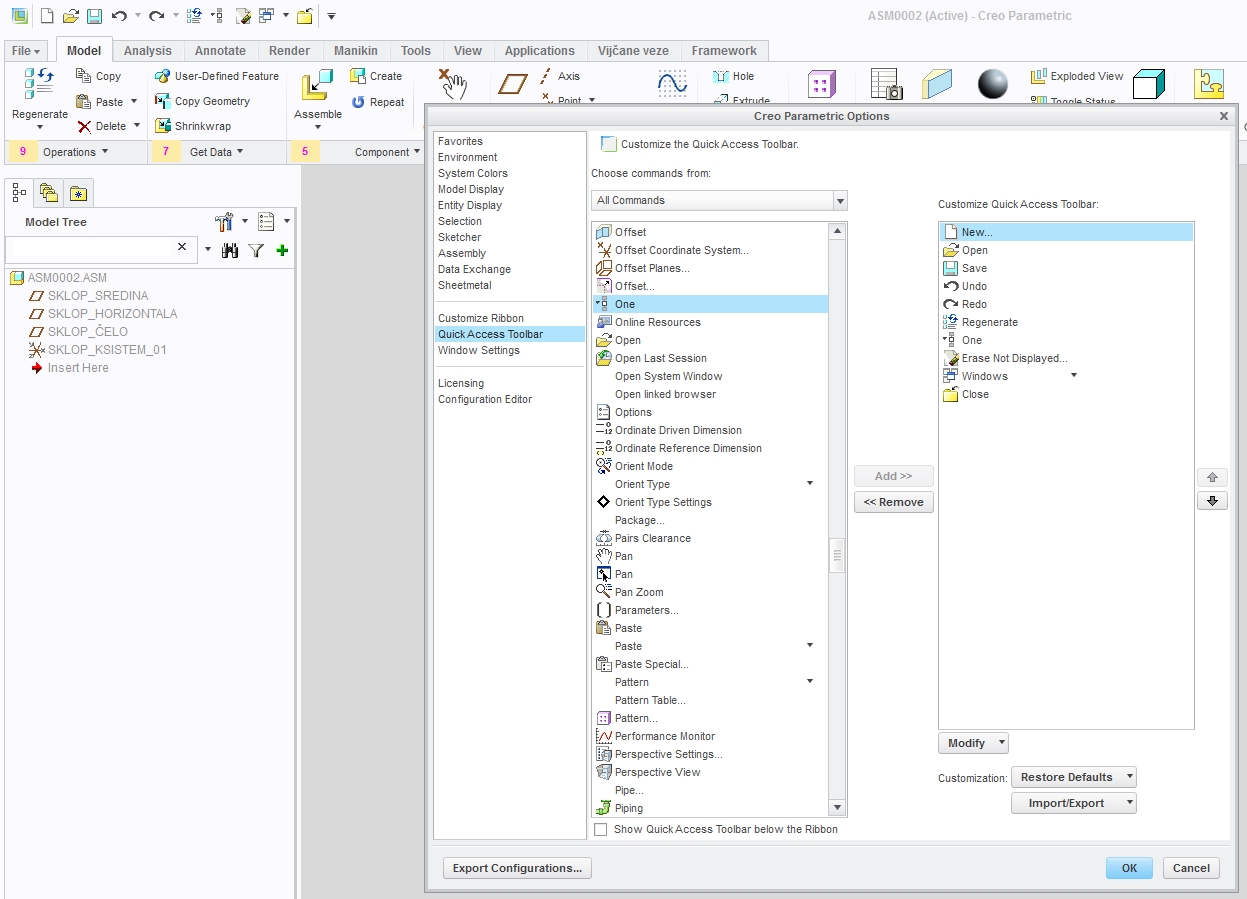
1. Go to assy mode and customize quickaccess:

h1.jpg

2. I see option in options-window setting but i cant check it. :S There is still enable_tree_indep option to be added in config.

3. You have to install help.

4 replies

16-Pearl
February 7, 2014

Hi John,

1. Go to assy mode and customize quickaccess:

h1.jpg

2. I see option in options-window setting but i cant check it. :S There is still enable_tree_indep option to be added in config.

3. You have to install help.

24-Ruby III
October 23, 2015

4. yes, dashboard's position cannot be changed.

3. Help installation package can be downloaded from PTC site. Installation sets variable PTC_HELP_CENTER_URL (it contains path to directory containing creo_help.exe file.

MH

1-Visitor
February 7, 2014

For #1, you can also: Select your component in the window then right click --> "Locate Model in Tree".

1-Visitor
February 12, 2014

before, You need use the button. In Creo 2.0 is standard below the right mouse button.

17-Peridot
February 12, 2014

Jon,

I was only able to add the "One" icon to a "New Group" I created called System Tools. I see that you can add it to the Quick Access Toolbar too.

tool+group.jpg

As others mentioned by others, the best thing is to have it in the RMB (One good improvement that from PTC).

Lance

1-Visitor
October 23, 2015

see the movie..... Creo 2.0, unlock the modeltree.