
1-Visitor
June 10, 2014
Solved

Creo - SharePoint 2010 - IE11

  • June 10, 2014
  • 2 replies
  • 3461 views

Helllo,

I have following problem.

Using Creo web browser with SharePoint 2010 and IE11 still getting me this error:
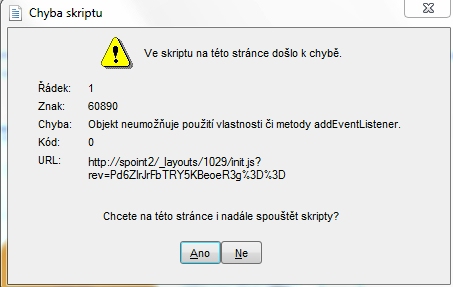
Err.jpg

error occurred in the script on this page

line: 1
sign: 60890
error: Object doesn't support property or method 'addEventListener'

Would you like to run scripts on this site in future?

Does anyone have any idea on how to solve this? Mozilla is no way for us. In IE11 itself page loads normaly.

    Best answer by ptc-6159429

    Script Debugging was not an issue.


    We solved it by using SharePoint 2013.

    2 replies

    1-Visitor
    June 23, 2014

    Hi Jiri,

    • What are the exact steps you are making when this error message is given?
    • Do you have Creo Parametric 1.0 or 2.0?
    • What datecode of Creo Parametric are you using? (File > Help > About Creo Parametric)

    Note that IE 11.0 is supported on Creo 2.0 M100 and above on Windows 7, 8, and 8.1. A stand-alone Internet Explorer browser uses script debugging by default. When you navigate to the Sharepoint page from an IE stand-alone browser, you might not see the message because IE is auto-debugging. Try the following (I have IE8 so the steps might be different.):

    1. Open IE stand-alone
    2. Tools > Internet Options > Advanced tab
    3. Uncheck "Disable Script Debugging (Internet Explorer)" and "Disable Script Debugging (Other)."
    4. OK
    5. Restart IE
    6. Navigate to the Sharepoint page again using the stand-alone browser with these new settings
    • If you see the error message, the issue is in the page itself.

    The following links contain additional information that may be of help:

    14-Alexandrite
    July 18, 2014

    Clint this is not true for Windows 7. IE 11 gives the errors Jiri is talking about unless you enable the config.pro option browser_limit_to_ie9_mode = yes I would not consider that "supported". All you have to do is have IE 11 installed and try to reach a Windchill page and it blows up with script errors.

    ptc-61594291-VisitorAuthorAnswer
    1-Visitor
    July 18, 2014

    Script Debugging was not an issue.


    We solved it by using SharePoint 2013.

    1-Visitor
    May 15, 2015

    Hi Jiri

    I am curious. Are you managing your Creo files in Sharepoint as if it was PDMLink or Intralink ?

    Best regards