
15-Moonstone
June 5, 2017
Question

Creo3.0 m120 installation hangs

  • June 5, 2017
  • 2 replies
  • 2937 views

Yet another issue with Creo 3.0 rollout.   Hoping others have seen this.  I've have a couple machines that have hung after you make your selections select the final install button.   They both stop at the same place.  The cpu sits at zero %, that is after you wait 5 minutes for task manager to start.   This has happened on a fairly new machine.  The kicker is I quit out, tried again.  It all installed.  But it wont run at all.  No errors nothing even comes up.  This is clicking parametric.exe, not an icon.     Coupled with the Creo Agent errors that still have not been solved by PTC tech's 6 hours remotely digging into our workstations ( I commend them they are working diligently on this) its hard to have any confidence in the this software actually creating geometry accurately when it struggles to copy a file and set an environment.

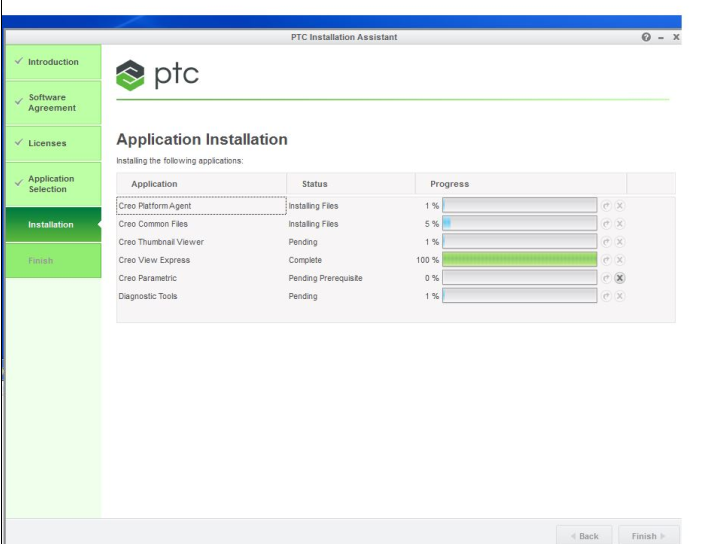
Both hung installs have stopped at this exact point.
2 replies

23-Emerald IV
June 5, 2017

Mark Steffke‌, Something is definitely messed up with the installer for Creo 3.0 M130 (long hang every time something is picked) and I've had a similar issue to what you're seeing above with Creo 4.0.  On the other hand, Creo 3.0 M120 installed just fine for me.  Two suggestions.  First, try just installing base Creo without the extra "stuff".  Second, try installing the extra "stuff" first.  You can find the individual installers in the "\install\addon" folder.  (For Creo 4.0 I had to do this to work around CS262160.)

24-Ruby III
June 6, 2017

Hi,

some users reported installation problems, when their IT set too strict security rules in Windows. If this is your case then I suggest test Creo installation in default Windows installation.

Note: On my Windows 7 PC, I have never had problems with Creo installation (any version). I install Creo into following directories ... E:\PTC\Creox_Mxxx

MH

msteffke15-MoonstoneAuthor
15-Moonstone
June 6, 2017

Thanks Martin.    I understand what your saying.  But all the Computers here have the same security, and many installs have went OK.    As an update I just had a chanced to try again.   Still no luck on this machine.  I uninstalled any previous attempt.  renamed the appdata/local/ptc folder for safe measure.  Removed any trace of the creo agent, or the PTC folders.  Reboot.  Same thing.   I will try Tom's workaround next. 

This is a machine that's just over a year old.   Its just hard for me to accept it being a computer/hardware/os/security issue when EVERY other piece of the  business software installs and runs without issue.   Are you listening PTC?  This is an embarrassment.

24-Ruby III
June 7, 2017

Hi,

my last tip ... create new local admin account, login as this new user and launch installation.

MH