1-Visitor
October 29, 2021
Solved

CreoView Adapters: Start of services after machine restart

  • October 29, 2021
  • 3 replies
  • 2438 views

Hi,

There are separate machines for Creo view adapters. 

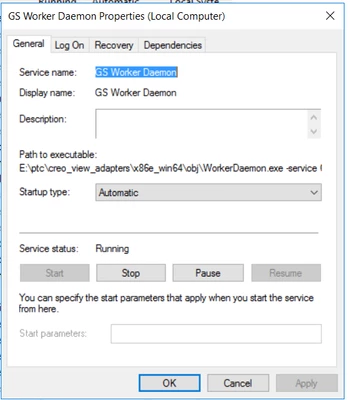
I configured them as Windows service (GSworkers).

In some machines, the service needs to be manually restarted after the machine restart.

Some machines, its get started automatically.

All machines' service settings are the same and the config is also the same in Windchill UI.
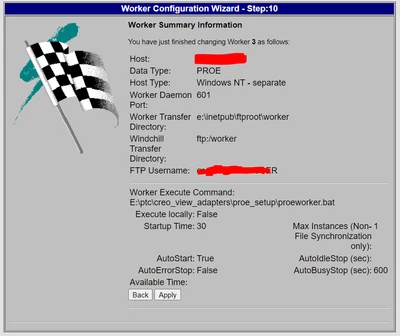
ArunPLM_0-1635495865254.png

ArunPLM_1-1635495906717.png


The below error is coming after the restart of the machine in those machines.

 

ArunPLM_2-1635495946990.png


Help to fix it, so that the services get started automatically.

Best answer by ArunPLM

Finally, upgrade only fixed the issue.

We have upgrade to Creo View adapters 8.1 and this issue disappeared.


3 replies

24-Ruby III
October 29, 2021

Here are some helpful articles:


24-Ruby III
November 1, 2021

Hi,

try following:

  • change the type of service start from Automatic to Automatic (Delayed Start)
  • restart machine
  • wait 2 minutes when machine is ready to use
  • check service status

If the service is running, then you can decrease 2 minutes period to something lesser.

See https://social.technet.microsoft.com/Forums/lync/en-US/d8f0e315-74d4-4890-a62f-ef427a8532e1/adjusting-the-autostart-delayed-start-time?forum=winservergen discussion at the bottom of the page (the response of hmqcnoesy_ user).

ArunPLM1-VisitorAuthorAnswer
1-Visitor
March 11, 2022

Finally, upgrade only fixed the issue.

We have upgrade to Creo View adapters 8.1 and this issue disappeared.