

23-Emerald III
September 17, 2015
Solved

CreoView rendering timesout

  • September 17, 2015
  • 17 replies
  • 5225 views

We have a file that when rendering in CreoView2 gets to the Generating Output stage after 8 minutes and then at 10 minutes Pro/E is stopped and the viewable is never completed.

The MS log shows a 600 second time reached. I have adjusted some of the timeout settings so none are at 600 seconds anymore, but I must be missing one or more.

Can someone suggest some property settings that will increase the time before the system timeout?


This thread is inactive and closed by the PTC Community Management Team. If you would like to provide a reply and re-open this thread, please notify the moderator and reference the thread. You may also use "Start a topic" button to ask a new question. Please be sure to include what version of the PTC product you are using so another community member knowledgeable about your version may be able to assist.
Best answer by TomU

If you look at the trail file on the worker is Creo actually into the PDF generation step?

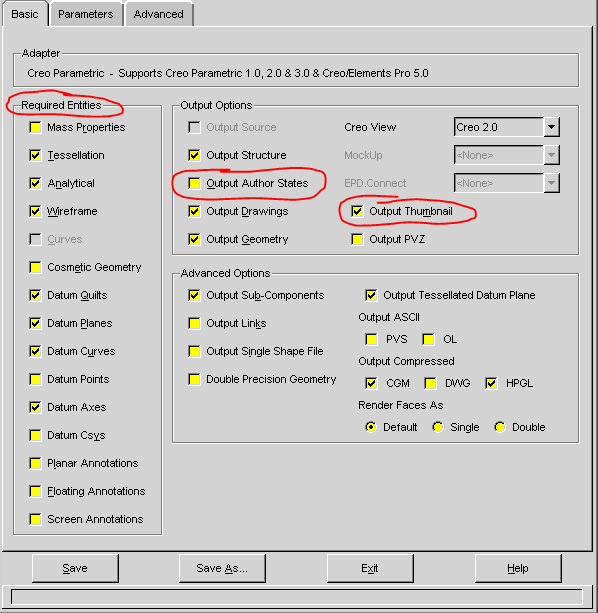
I've seen publishing hang (and fail) due to things missing that the recipe file says are required.  It might be worth unchecking some things just to see if it makes a difference.  (I'm not positive if these affect drawings, especially PDFs.)

recipe.PNG

17 replies

BenLoosli23-Emerald IIIAuthor
23-Emerald III
October 2, 2015

Hopefully someone will have an idea of what setting is needing to be adjusted.

23-Emerald IV
October 2, 2015

There are CAD worker timeout settings and there are separate Windchill property timeouts for parts, drawings, and assemblies.

See http://support.ptc.com/cs/help/creo_hc/creoview3_hc/index.jspx?id=TheRecipe_Editor-Recipe_Editor_Tasks-AConfiguring_Work…

publish.cadtimeout.component–600 seconds

publish.cadtimeout.assembly—3600 seconds

publish.cadtimeout.drawing—600 seconds

publish.cadtimeout.<ObjectType>.<AuthApp>—3600 seconds

worker.PNG

BenLoosli23-Emerald IIIAuthor
23-Emerald III
October 2, 2015

Mine are set to:

publish.cadtimeout.component–900 seconds

publish.cadtimeout.assembly—3600 seconds

publish.cadtimeout.drawing—1200 seconds

I added the AutoIdle and AutoBusy at 900.

I set the  Advanced-System values to:

ShortServer: 900

ShortHelper:300

LongServer:2400

LongHelper: 4200

I just tried another drawing generation and it timeout after 13 minutes, but the MS log still says 600 seconds.

23-Emerald IV
October 2, 2015

Are you talking about in the recipe editor?

timeout.PNG