2-Explorer
June 10, 2021
Question

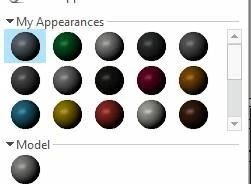
Dark Appearance Palette

  • June 10, 2021
  • 1 reply
  • 16157 views

I believe this has come up before, but the previous solution is not available in my Creo 6.

Colors in the model seem fine but selecting a color from the palette is a challenge... They are all dark. 
doneill_0-1623348459010.jpeg


1 reply

23-Emerald III
June 10, 2021

Just finished responding to the other post...LOL


Seems like that option was maybe replaced with texture_search_path

I'm not sure that's a true statement but you may want to look and see if you have that set and temporarily remove  it and restart Creo to see if it improves.

The way I solved this initially was to remove all my config.pro files and start Creo. When the problem was gone, that told me it was definitely a config setting.

Then I cut away 1/2 the config and I figured out which 1/2 had the problem setting. Then I cut that partial config in 1/2 again and again until I could tell which setting it was. It probably took less than an hour to do this.

doneill2-ExplorerAuthor
2-Explorer
June 10, 2021

Thanks for the reply!  

I've run it without my config.pro... no change...

One of my coworkers does not have the issue... but another one has the same issue.  

My graphics driver is up to date... 

This one's a challenge.  

I appreciate your work on this.

23-Emerald III
June 10, 2021

Add the config.pro option

GRAPHICS WIN32_GDI

If the colors are better, it tells you there is a graphics card issue. Maybe loading an older driver. 

Just don't leave that option as active, it will slow everything down!
