Marco Tosin
21-Topaz I
21-Topaz I
October 19, 2015
Question

Dashboard

  • October 19, 2015
  • 2 replies
  • 6764 views

After some weeks using PA for Creo I would like to discuss some hints and also have further clarifications.


First of all, what cause me a headache every day is MTTX history chart.


What I would expect it's not to have data of last 4 weeks changed every single day.

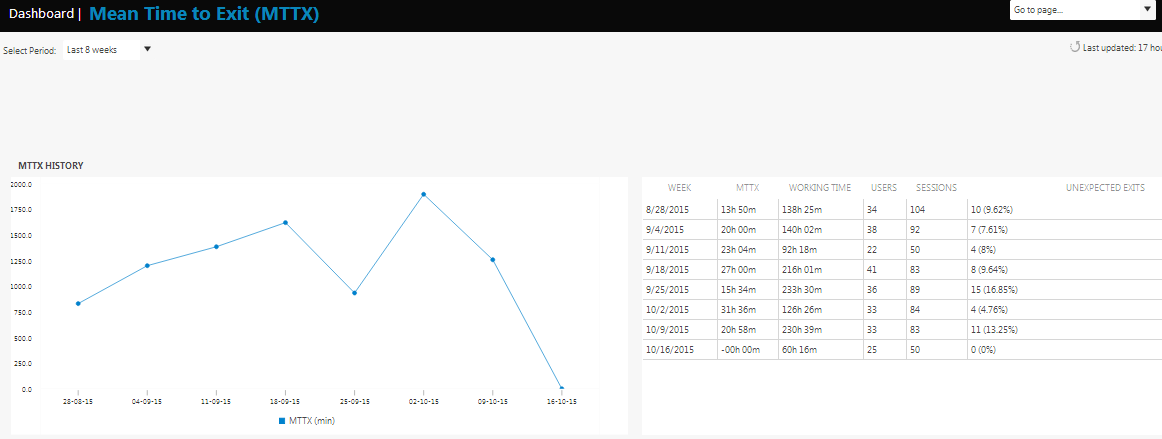
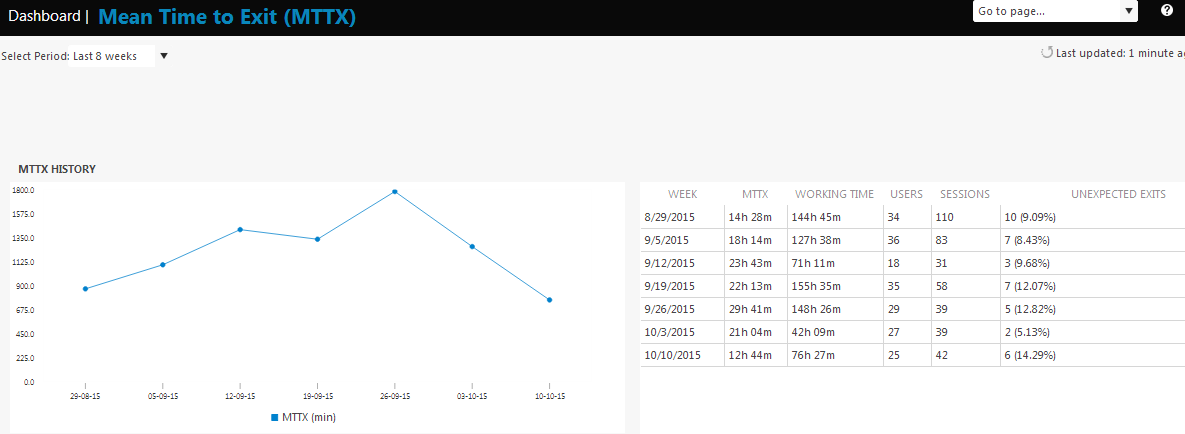
Attached are two pictures taken last two Fridays at the same exact time in the evening.
 

MTTX - 09102015.PNGMTTX - 16102015.PNG


As you can see, the starting day of the week is different and the first picture has 7 rows instead of 8 (selected period is last 8 weeks).


In this way every day the progress of the chart varies and it becomes difficult to follow the trend.


Another issue concerns the MTTX time.

I know that a number divided by 0 is equal to 0, but I think that, if there are no unexpected exits, the MTTX time should be equal to the working time otherwise you'll see a chart like second picture, where it seems that Creo no longer works for any user.


To better understand the progress of the chart it would also be useful to be able to add notes to track a particular event, for example, a user who continues to commit the same mistakes, although he knew how to avoid it.


The last issue concerns users identification (UID).

If you encrypted UID and UUID and also change this values regardless of whether they are the same (in Windows Active Directory every user has its own SID), how we can work with users to solve issue?


We have about 60 Creo users and 11 of them has two different UID.


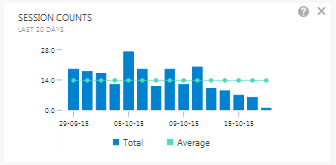
Last but not least: many data sessions are not appearing in Session Counts dashboard even if they are present in SentFiles folder (see lat few days in attached picture).
 

MTTX - Sessions.PNG

2 replies

23-Emerald IV
October 19, 2015

Without the ability to correlate user (username or computer name) to a session, I find the whole thing rather useless.  I have no interest in maintaining a custom look-up chart between UID's, UUID's, users, and computers.

I do agree with your comment about zero unexpected exits.  These should be the highest points on the chart, not the lowest.

...if there are no unexpected exits, the MTTX time should be equal to the working time otherwise you'll see a chart like second picture, where it seems that Creo no longer works for any user.

It does look like something changed with how the data is being reported or processed by PTC.  We're suddenly showing twice the number of users:

mttx1.PNG

The exit percentages are also completely unrealistic.  (Things are working good right now.  I would be getting a non-stop earful if we really were crashing this much!)

mttx2.PNG

23-Emerald IV
October 19, 2015

Correction on the last two point above.  I think the increase in users is due to the Windchill CAD workers being included.  I'm guessing the increase in MTTX is due to how the CAD workers terminate Creo when done.  (The sessions are terminated after being idle for a certain period of time.)  Looks like I either need to figure out a way to separate the CAD worker sessions from the "normal user" sessions or just shut off reporting on the CAD workers all together.

1-Visitor
October 19, 2015

Hi Marco, hi Tom,

This is very good feedback. There are a few interesting subjects here; user names, and user 'groups'. The latter; might be addressed by 'tagging' machines/users that either perform a specific function (i.e CAD Workers, batch jobs etc) or belong to a specific site/BU/project/team.

I would suggest opening Product Ideas to allow voting, and community members can join in on the topic discussion.

Thanks for posting this!

- Dan

Marco Tosin
21-Topaz I
21-Topaz I
November 23, 2015

It's been three days since nothing new came in my dashboard.

Does anyone else have the same issue?

OLD.PNG

MTTX.PNG

Marco
Marco Tosin
21-Topaz I
21-Topaz I
November 27, 2015

I have got an answer from TS about above comment:

... As it seems no session recorded after last Sunday is showing in the dashboards.

It is a general issue, not only affecting you, but other customers as well.

Our own data at PTC does not show newer sessions either...

Marco
Marco Tosin
21-Topaz I
21-Topaz I
December 1, 2015

Sessions data are back from last Thursday (11/26).

Marco