
1-Visitor
January 18, 2014
Solved

Datums and Names

  • January 18, 2014
  • 4 replies
  • 7595 views

CREO Elements/Pro 5.0

Release 5.0

Date Code: M170

I have a part in which I want to create a Datum named A.

When I attempt to, I get the message "You have entered a name A that has already been taken"

I have turned on every item in the tree under Tree Filters.

I have searched the model, but no features, datums, etc with the name.

Is there something I'm missing?


This thread is inactive and closed by the PTC Community Management Team. If you would like to provide a reply and re-open this thread, please notify the moderator and reference the thread. You may also use "Start a topic" button to ask a new question. Please be sure to include what version of the PTC product you are using so another community member knowledgeable about your version may be able to assist.
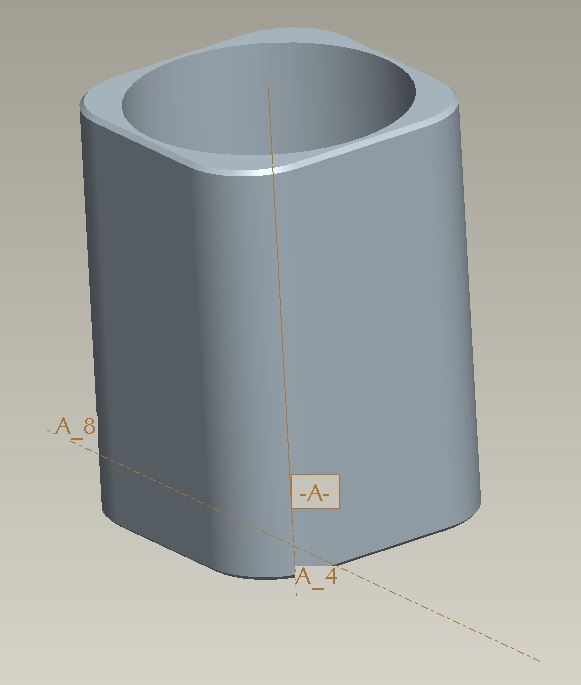
Best answer by Kevin

Your Extrude 1 has two sketched features, one of which is a construction circle. If you change it to geometry you will see datum A.Capture.JPG

4 replies

17-Peridot
January 19, 2014

Brian, you might look to see if you suppressed a datum plane called A.

I can take a quick look at your file if you like. Use the advanced editor (upper right of the message window) to attach files.

1-Visitor
January 19, 2014

Have you looked for embeded features? In earlier releases you could create what were called datums on-the-fly which, if I remember correctly, could cause problems. These were different from the ones you see now in that they were used at the time of feature creation and didn't show up in the model tree. When updating to a new version of ProE the feature would give you an indication of the problem but it would show up as a missing reference.

bherr1-VisitorAuthor
1-Visitor
January 20, 2014

Just so we are on the level...

I have unsuppressed every object.

I have expanded every branch.

I have done all these things.

I even looked throughout the drawing for the part to see if someone had previously generated a drawing entity named "A" that is preventing the part from having the same name.

What I ultimately did was delete features in the tree until I was allowed to create a datum/feature with the name "A."

It ended up being the in the "Extrude 1."

But even though I searched the reference viewer, I find no mention of a feature or reference named "A."

It was a simple enough part, I just deleted the initial extrude and rebuilt the model, but I would like to know what I'm missing to solve future problems.

There is a cross section "A," but even though I may delete it, I still can't create a feature named "A."

I checked all the dimensional names and none of them are "A."

I was really hoping that there is a utility for cleaning part files.

I'm very familiar with CATIA V5 and it has a built in utility called CATDUA V5 that cleans the file of check sum errors, faulty data, bad links, etc.

bad_datums_1.JPGbad_datums_2.JPG bad_datums_3.JPG

1-Visitor
January 20, 2014

It's possible that an axis is created that is part of the feature and the axis was assigned the name "A".

14-Alexandrite
January 20, 2014

Not sure if you can do this on CREO Elements/Pro 5.0, but try using the feature search and look for a datum called A and if it finds one rename. Do you use set datums for gtols. It could be someone has set a surface as datum A.