

3-Newcomer
September 24, 2024
Solved

DEFAULT_CALLOUT_FORMAT_DATA

  • September 24, 2024
  • 2 replies
  • 1199 views
I am using Creo Parametric Release 10.0 and Datecode10.0.1.0

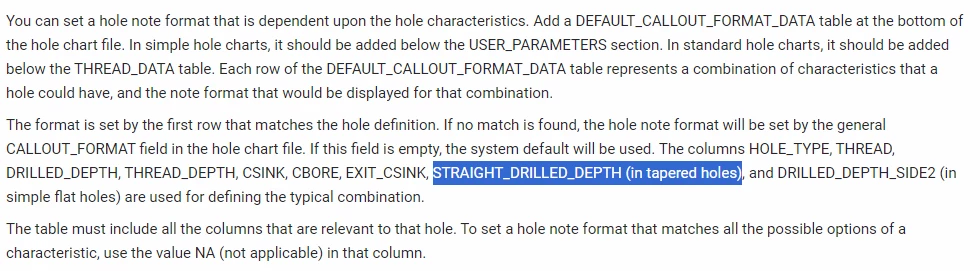
Tapered threads do not show up in the dialog box once I add a DEFAULT_CALLOUT_FORMAT_DATA to the hol.-file.
The hol.-file has previously worked in Creo 8
    Best answer by MartinHanak

    Hi,

    you have to add STRAIGHT_DRILLED_DEPTH token into DEFAULT_CALLOUT_FORMAT_DATA section.


    https://support.ptc.com/help/creo/creo_pma/r11.0/usascii/index.html#page/part_modeling/part_modeling/Thread_Notes.html

    MartinHanak_0-1727189082092.png


    2 replies

    3-Newcomer
    September 24, 2024

    I have attached the hol.-file.

    Does anybody know why the thread does not show up in the dialog box once I add a DEFAULT_CALLOUT_FORMAT_DATA to the hol.-file?
    Everything has been done according to:
    Formatting Thread Notes (ptc.com)


    Thanks in advance.

    24-Ruby III
    September 24, 2024

    Hi,

    you have to add STRAIGHT_DRILLED_DEPTH token into DEFAULT_CALLOUT_FORMAT_DATA section.


    https://support.ptc.com/help/creo/creo_pma/r11.0/usascii/index.html#page/part_modeling/part_modeling/Thread_Notes.html

    MartinHanak_0-1727189082092.png


    Mahesh_Sharma
    22-Sapphire I
    September 27, 2024

    Hello @TA_10763298 


    Did you get a chance to test the suggestion?


    Thanks 

    3-Newcomer
    September 27, 2024

    Yes, it works well with my file now.

    Thank you for the help!