
1-Visitor
October 30, 2019
Question

Edition features troubles

  • October 30, 2019
  • 2 replies
  • 1238 views

Hi,


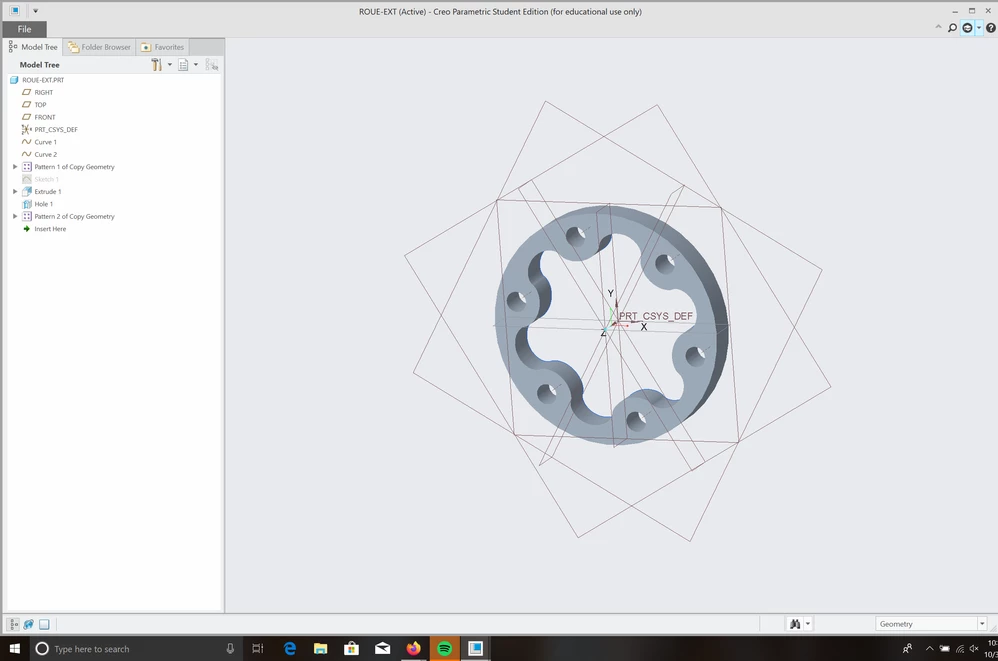
I've just installed Creo Parametric 4.0 on my laptop (yes my college is still using the 4th version) but when the installation is finished I open Parametric but I haven't the top toolbar in the main menu and in the pieces that I'm trying to edit. I can't edit my piece even with a right-click on the windows. 


many thanks in advance 😉


Here's a screenshot :
 

Capture.PNG

2 replies

24-Ruby III
October 31, 2019

Hi,

before starting Creo, do following actions

  • start Windows Explorer
  • go to %APPDATA% directory
  • rename PTC subdirectory to PTC_01

Test Creo behaviour.

18-Opal
October 31, 2019

Hello,


Try Ctrl +F1 to see if the Ribbon expands.


Amit