

4-Participant
November 29, 2024
Solved

Error -9 requesting new student license for creo 8.0.4.0

  • November 29, 2024
  • 1 reply
  • 2784 views

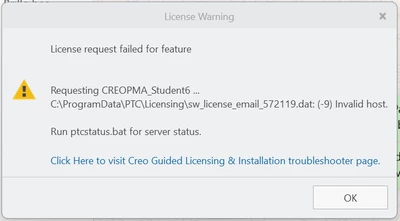
I have installed my CREO 8.0.4.0 student edition two months ago and now i get the Error message that the "license request failed for feature." 

Error code -9. 

Please find picture underneath.
PD_10684929_0-1732871381805.png


Best answer by JamesAvis

Since you have Creo installed, navigate to the Parametric\bin folder in your Creo installation (you can probably find it by right clicking on any Creo shortcut, Open File Location), open a command prompt there (you can do this by clicking in the address bar, type CMD, hit enter), then enter the command:


ptchostid.bat


This will tell you what Creo sees as your host ID. If it does not match 98-AF-65-73-18-FB, you'll need to request a new license file with the correct host ID.

1 reply

24-Ruby III
November 29, 2024

Hi,

HOST-ID included in license file does not correspond with physical address of any network card installed in your computer.

4-Participant
December 3, 2024

Hi, thank you for your fast response. How can i get a license that corresponds with my physical address of my network? What do i have to do? I tried using the node Locked License Generation with the code BK800908EDSTUDENTEDUNI a bunch of times, but it just says Error after asking me for login details. 


24-Ruby III
December 3, 2024

@PD_10684929 wrote:

Hi, thank you for your fast response. How can i get a license that corresponds with my physical address of my network? What do i have to do? I tried using the node Locked License Generation with the code BK800908EDSTUDENTEDUNI a bunch of times, but it just says Error after asking me for login details. 


Hi,

please do following:

  • upload MartinHanak_0-1733219541355.png file
  • open Command prompt window
  • run ipconfig /all > ip.txt command
  • upload ip.txt file

I will investigate both information sources and let you know what to do.