

1-Visitor
May 11, 2017
Solved

Error I Cannot Fix - Need help

  • May 11, 2017
  • 3 replies
  • 16495 views

I have an error in my model. The error showed up while creating some tubing using the Piping application. I worked on trouble shooting it, couldn't figure it out. I deleted everything related, and couldn't figure it out. Unfortunately I worked on too many things to undo checkout and completely roll back to the previous version. I have completely deleted everything that was could have been related to the error. Attached is a screenshot of the error. The text is "ERR: internal datum 9713 of feat 9777 is missing". Neither this datum or feature exist anymore, but I cannot get rid of the error on regeneration.

This model is going to be copied to create 4 other units, and these are the North American standard units... so I want them to be clean and free of errors (even more than I usually would.)

I have removed all Model References that were possible, all unnecessary features, and tried to make the model as "light" as possible. None of this has helped.

Does anyone know something else I can try?
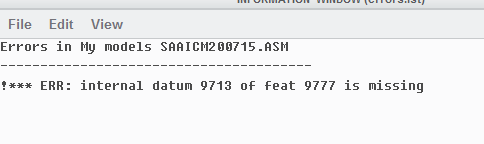
Internal Datum Error.PNG

Best answer by swood

Yes, I did get feedback and forgot to update this thread.

(video is below, I typed out the steps before realizing I could post the video)

Open your part/assembly with issues.

Ctrl+F to search for the issue. Search by Name, and (the important part I didn't know before) switch to the HISTORY tab. Type your feature number into the Value field and select FIND NOW.

Your feature should show in the box to the left. It will not highlight anywhere in your model because it doesn't exist any more. Use the >> arrows to move it to the right side (which selects it). Now select Close to close the dialog box. Do no click anywhere else! Move your cursor over an open area in your model window and right-click. Select delete. This will most likely bring up a window saying it will delete highlighted features. If it does, select the Options button select all objects shown and change them to Suspend.

Another strange aspect of this...  you are still going to get the same error FOR NOW. If you search again for the same feature you will also still be able to see it. Save the model, close it, and Delete Not Displayed. Reopen the model and everything should be okay.


If this works, please mark it as the Solution so everyone else will know. This worked for me on two different assemblies. Also let me know if you have any more questions.


Unable to play video. Please try again later.
(view in My Videos)

3 replies

1-Visitor
May 11, 2017

If the feature didn't exist then the error should not exist. Either that or there is an internal error in the model data and that will require PTC to repair.

The find command should be able to find Feature 9777 using the feature number.

swood1-VisitorAuthor
1-Visitor
May 11, 2017

Thank you for the reply. The find tool does not find the feature (unless I'm screwing something up.)

Find.PNG

I'll contact PTC and see what they can do. If anyone else has ideas, I would still appreciate them.

24-Ruby III
May 12, 2017

Hi,

use ID option instead of Number option when searching.

MH

10-Marble
May 12, 2017

Try this config.pro option and have another look at the Reference Viewer afterwards.

The missing components/references should be marked with a dashed/dotted red line which can be deleted with right mouse click.

When I had this problem, I had to delete them twice w/ saving/regenerating.

not_placed_comp_should_be_shown yes

HTH

P.S. Only works for Creo 2.0 M130 and higher.

swood1-VisitorAuthor
1-Visitor
May 12, 2017

I fixed my search and it finds the item, but it still doesn't show in the Model Tree (with no filters). I cannot figure out how to do anything with it.

Find ID.PNG

We are running Creo 2.0 M170, so I changed the config setting (had to do in text file as option wasn't visible when searching for it).

Restarted Creo and option still doesn't show.

Reference Viewer only finds this.

References.PNG

This was unrelated, but I managed to fix it.

Still getting error and cannot find F18(Sketch_13).

23-Emerald III
May 12, 2017

Can you upload the models? Error messages are notoriously vague.