
1-Visitor
December 8, 2017
Question

Hide invisible lines on Drawing

  • December 8, 2017
  • 3 replies
  • 2794 views

Hi guys,


I can't figure out how to adjust the settings for the following case. There's line (that lower part of the hole) that should be invisible because it is behind the object (bracket).

Any ideas? Everything else is great.  Thank you 🙂
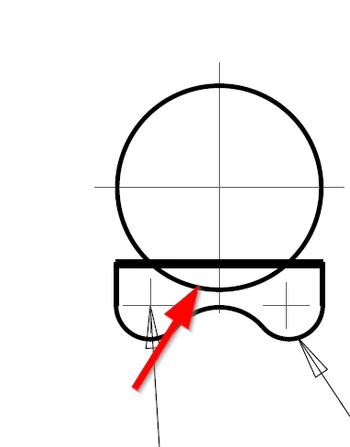


12082017_1.png

3 replies

23-Emerald III
December 8, 2017

In the view properties, do you have the view display set to NO HIDDEN?

If there is intereference in parts assembled, that can also sometimes cause odd display issues.


pvn1-VisitorAuthor
1-Visitor
December 8, 2017

Yes. It is set to NO HIDDEN. And there are no interferances. Are there any other settings that might affect this?

1-Visitor
December 8, 2017

The other possibility is that it's a surface which is controlled with a separate setting, particularly in section views.

23-Emerald III
December 9, 2017

Can you share the drawing and models with us? It would be much easier to figure out.

17-Peridot
December 11, 2017

Isthere any sketch or curve that is not hidden?