

Solved
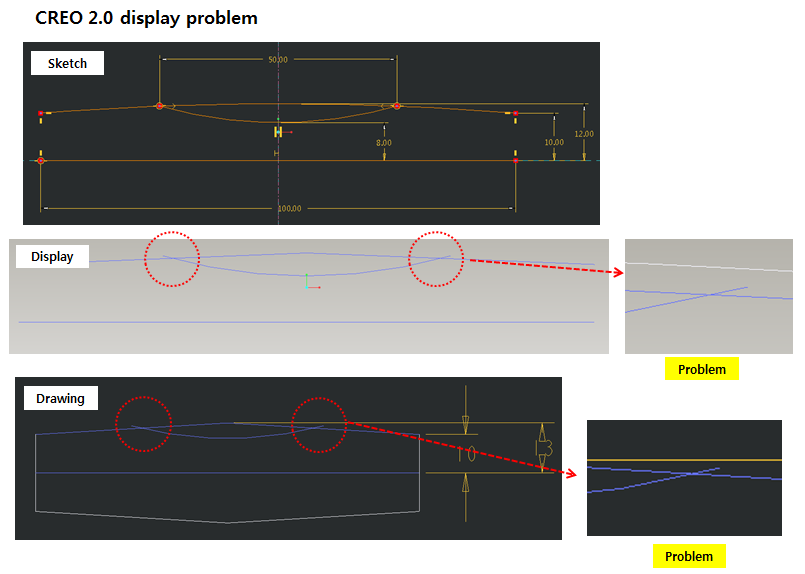
How can I solve the Creo 2.0 display problem?
I'm using Wildfire 3.0 and Creo 2.0 on same PC
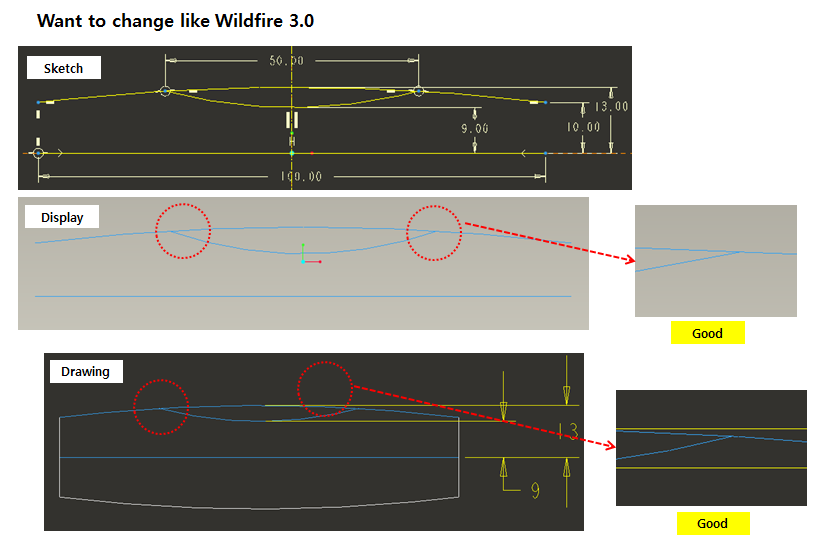
but there is a display problem only Creo 2.0 like below images
and I have tried to change config and graphic options.
please let me know how to solve the problem.
thank you
-edge_display_quality very_high
-shade_quality 50
-display_shilhouette_edges
-skip_small_surfaces
-default_abs_accuracy 0.00012 (1.2e-4)
-set antialiasing mode on
-Control Pannel/ Graphic Card:Manage 3d setting: PTC Pro/Engineer / Creo 2.0
This thread is inactive and closed by the PTC Community Management Team. If you would like to provide a reply and re-open this thread, please notify the moderator and reference the thread. You may also use "Start a topic" button to ask a new question. Please be sure to include what version of the PTC product you are using so another community member knowledgeable about your version may be able to assist.
 !!!).
!!!).