Solved
How do you import a table in the Function Definition dialog box within Mechanica or the Simulate module?
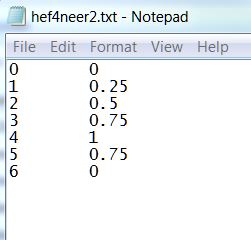
In my simulation, I'm trying to import a table in the Function Definition dialog box. What file types/formats are supported? I've tried CSV, XLS, XLSX, TXT but none of them work. The only error message I receive is "Error reading the file."
This thread is inactive and closed by the PTC Community Management Team. If you would like to provide a reply and re-open this thread, please notify the moderator and reference the thread. You may also use "Start a topic" button to ask a new question. Please be sure to include what version of the PTC product you are using so another community member knowledgeable about your version may be able to assist.