
7-Bedrock
Mar 1, 2023 10:31 AM UTC
Solved

How to Access license sever Via VPN without turning off firewall

Hi everyone, 

I am creating VPN so that i can access PTC- Creo licence sever (in a sever Computer at offiice) from other internet. But it not totally success as i want. 

If we are using the same network (wifi or wired) with sever computer, everything works fine (already add exception for in-bound and out-bound port 7788). Then we want to work remotely -> need to create VPN so that we can access to the license sever from outside. I created a VPN following this website: https://www.draytek.com/support/knowledge-base/5330

I connected to the office network successfully via VPN, but when i open Creo, it shows error: license cannot found. I ask support from supplier, then they suggest to turn off all firewall for both sever computer and user's computer as the picture below. Then i open the Creo successfully, they are not support me anymore after that 
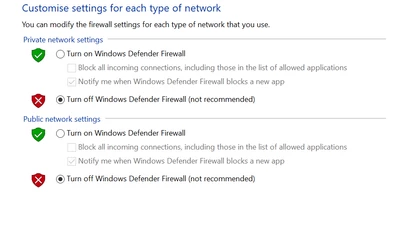
VT_9992491_1-1677665641196.png

What should i do next to access to the license sever without turn off these firewall? 
It is so dangerous when turning them off 


Vu_TranAnswer
7-Bedrock
Mar 6, 2023 10:32 AM UTC

i followed a lot of instructions here: https://www.ptc.com/en/support/article/CS110511

however, i just want to find one right thing to do and find out the answer for my specific question. It is here: 


Add License server information in the file called "hosts" on client as follows:

  1. Search for Notepad in Windows Search area
  2. Right click and “Open as Administrator”
  3. Select File > Open, change filter to All Files (*.*)
  4. Access “hosts” file, available at “C:\Windows\System32\drivers\etc”
  5. Add IP_Address and server_name


     with following syntax:

    IP_Address Server_Name

  6. Press File > Save and File > Exit

3 replies

16-Pearl
Mar 1, 2023 11:44 AM UTC

Try specifying the vendor daemon port number in the license file, and add the exception for that port as well.

In the license file, add a port number on the DAEMON line.

SERVER <servername> PTC_HOSTID=<MAC> 7788
DAEMON ptc_d port=45115

FlexLM uses 2 ports. The lmgrd.exe port is listed on the SERVER line and is typically 7788 for PTC. The vendor daemon port specification is not required, and will be assigned randomly if not specified. If you look in the log file, you can see which port is assigned currently. You can reuse that port on the daemon line or use one of your own.

Regards,

Dan N.

Translate
24-Ruby III
Mar 1, 2023 1:18 PM UTC

Hi,

you have to define 2 Inbound rules on license server and enable communication

for 2 ports (see @dnordin reply)

-OR-

for 2 exe programs (lmadmin.exe+ptc_d.exe or lmgrd.exe+ptc_d.exe)

Translate
Vu_Tran7-BedrockAuthorAnswer
7-Bedrock
Mar 6, 2023 10:32 AM UTC

i followed a lot of instructions here: https://www.ptc.com/en/support/article/CS110511

however, i just want to find one right thing to do and find out the answer for my specific question. It is here: 


Add License server information in the file called "hosts" on client as follows:

  1. Search for Notepad in Windows Search area
  2. Right click and “Open as Administrator”
  3. Select File > Open, change filter to All Files (*.*)
  4. Access “hosts” file, available at “C:\Windows\System32\drivers\etc”
  5. Add IP_Address and server_name


     with following syntax:

    IP_Address Server_Name

  6. Press File > Save and File > Exit
Translate