
1-Visitor
October 9, 2015
Solved

How to do a section in an axonometry wiew in drawing?

  • October 9, 2015
  • 1 reply
  • 3894 views

Hi

I have to do an axonometry wiew but with a section! And if is possible in shading with edge rappresentation as in the picture below!
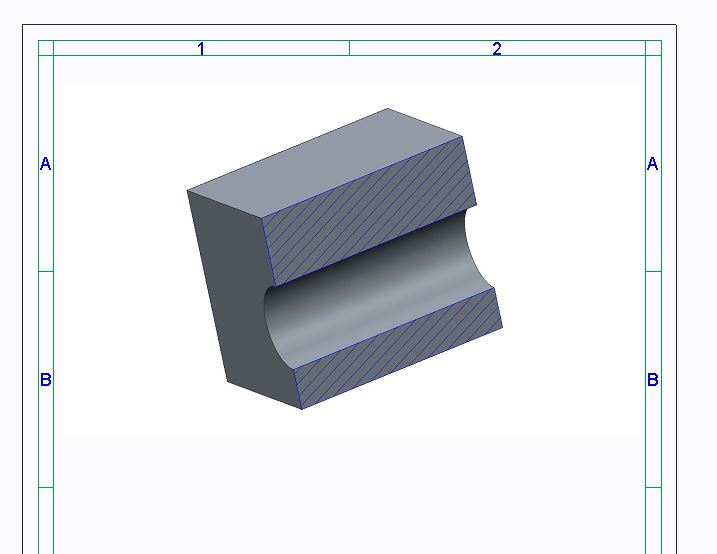
Capture_ptc.JPG


I did this saving the jpeg file and putting it as object in drawing, is the only way to do it?


Thanks!


This thread is inactive and closed by the PTC Community Management Team. If you would like to provide a reply and re-open this thread, please notify the moderator and reference the thread. You may also use "Start a topic" button to ask a new question. Please be sure to include what version of the PTC product you are using so another community member knowledgeable about your version may be able to assist.
Best answer by MartinHanak

Luca,

you can use following procedure:

1.] add x-hatching default real number parameters into your model (Tools > Parameters)

default_xhatch_angle

default_xhatch_spacing

See details in http://help.ptc.com/creo_hc/creo30_pma_hc/usascii/index.html#page/pma/fundamentals/fund_four_sub/To_Set_the_Default_Spac…

These parameters drive x-hatching properties displayed on the drawing.

2.] create Zone (3D x-section) in your mode ... see myzone in my model (created in CR2 M070)

3.] in drawing view properties in Sections category set 3D cross-section myzone

You cannot modify x-hatching of 3D x-section in Drawing mode!!!

MH

1 reply

24-Ruby III
October 12, 2015

Luca,

you can use following procedure:

1.] add x-hatching default real number parameters into your model (Tools > Parameters)

default_xhatch_angle

default_xhatch_spacing

See details in http://help.ptc.com/creo_hc/creo30_pma_hc/usascii/index.html#page/pma/fundamentals/fund_four_sub/To_Set_the_Default_Spac…

These parameters drive x-hatching properties displayed on the drawing.

2.] create Zone (3D x-section) in your mode ... see myzone in my model (created in CR2 M070)

3.] in drawing view properties in Sections category set 3D cross-section myzone

You cannot modify x-hatching of 3D x-section in Drawing mode!!!

MH

lnessi1-VisitorAuthor
1-Visitor
October 12, 2015

It works thanks!!

I have a little question more!

I have to do it in an assembly, is possible to exclude any components? an example screws, nuts exc...

Thanks!

24-Ruby III
October 12, 2015

Luca,

I tested below described procedure using assembly with 2 components.

In Assembly mode:

1.] I defined zone

2.] I defined layer and put unwanted component into it

3.] I hid the layer and saved layer status into layer state (Layer_State002_1Comp)

layer_state.png

4.] I defined combined state (Comb0001 referencing Layer_State002_1Comp)

comb.pngcomb3.png

In Drawing mode:

5.] I created view referencing combined state (Comb0001)

If you do not understand my procedure, please let me know. Tomorrow I can prepare example data for you.

MH