

10-Marble
July 8, 2015
Question

How to make scroll wheel zoom work in Windows 10 with Creo Parametric

  • July 8, 2015
  • 34 replies
  • 149346 views

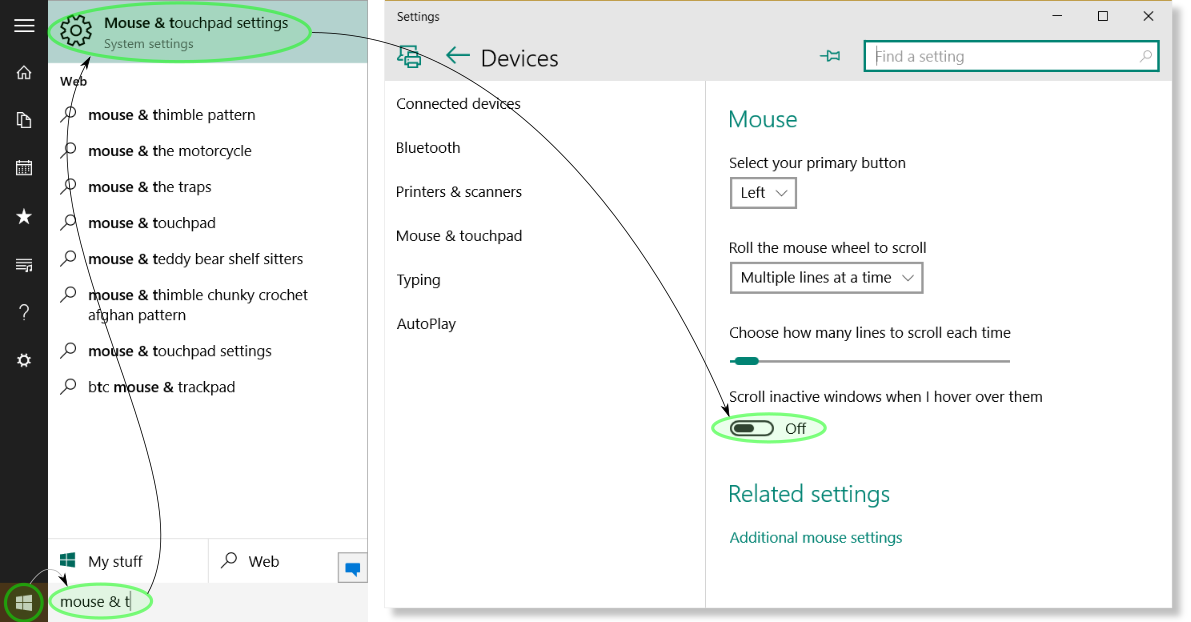
I had a very difficult time finding a solution for this. I opened a call and PTC said Windows 10 wasn't a supported configuration. Fortunately a curious co-worker discovered the fix. Not having zoom with the scroll wheel was a show stopper for me. Here's how to make it work as before:
win10-scroll_wheel.png

1. Select the Start button


2. Type "mouse & t" in the search area and press Enter


3. In the Mouse & touchpad settings dialog select the toggle for Scroll inactive windows when I hover over them until it displays Off.


4. Launch Creo Parametric and marvel at mouse wheel zooming

34 replies

1-Visitor
July 25, 2015

Hurray.....!

Thank You

Its Working

1-Visitor
July 29, 2015

hi, i did it in windows 10 and it doesnt work... i cant make zoom with the wheel in my windows 10... so i cant use the program. what can i do??

12-Amethyst
July 29, 2015

temporary, set mapkeys.

I have it for the function keys F2 and F3: Zoom in and out respectively

mapkey zi @MAPKEY_NAMEZoom in;@MAPKEY_LABEL>Zoom in;\

mapkey(continued) ~ Activate `main_dlg_cur` `ProCmdViewZoomIn.view`;

mapkey zo @MAPKEY_NAMEZoom out;@MAPKEY_LABEL>Zoom out;\

mapkey(continued) ~ Activate `main_dlg_cur` `ProCmdViewZoomOut.view`;

mapkey $F2 @MAPKEY_NAMEDefine Zoom box;@MAPKEY_LABEL>Zoom In;%zi;

mapkey $F3 @MAPKEY_NAMEZoom Out;@MAPKEY_LABEL>Zoom Out;%zo;

1-Visitor
July 31, 2015

Thank you for your help.

Good working.

1-Visitor
August 5, 2015

thank you!!!

12-Amethyst
August 6, 2015

This worked for me on Windows 10 - many thanks.

4-Participant
August 8, 2015

You are the best in the world !!!!!!!!!!!!!!!!!

I was very disperated but you are my savior !!!!

many many thanks

1-Visitor
August 11, 2015

Thank you very much!

1-Visitor
July 20, 2018

I'm having this same problem with my wireless M590 and the above solutions did not work but I have the other culprit to my problem which solved it and though I would share:


If you are having trouble zooming in Creo with mouse wheel go to control panel>hardware sound>mouse and click on the "Wheel" tab and set the option in the vertical scrolling area  "one screen at a time" this solved my problem.

1-Visitor
September 1, 2020

Thank you so so much! Worked like a charm! 😁

1-Visitor
August 13, 2015

You, sir, are awesome.

1-Visitor
August 14, 2015

Thank you very much!

1-Visitor
August 14, 2015

Its Working Thank you very much!