
1-Visitor
May 7, 2014
Question

Huge icons

  • May 7, 2014
  • 1 reply
  • 1863 views

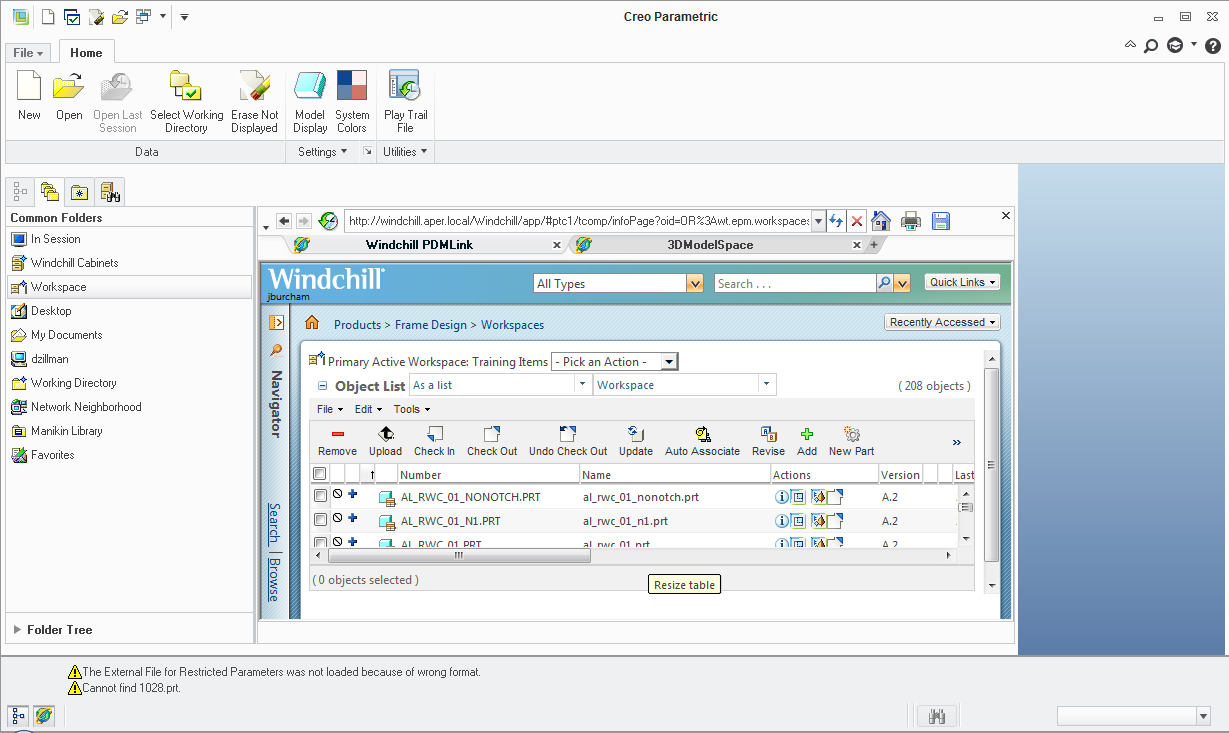
I just got new monitors and now everything in the Creo GUI is huge. I also can't really see anything in my Windchill. I've checked all the windows settings I am aware of for monitors, and those are how i want them.

Has anyone had this happen or does anyone have any recommendations on how to fix? I haven't been able to find any GUI options in Creo for this.huge+icons.png

This thread is inactive and closed by the PTC Community Management Team. If you would like to provide a reply and re-open this thread, please notify the moderator and reference the thread. You may also use "Start a topic" button to ask a new question. Please be sure to include what version of the PTC product you are using so another community member knowledgeable about your version may be able to assist.

1 reply

14-Alexandrite
May 7, 2014

James Burcham wrote:

I've checked all the windows settings I am aware of for monitors, and those are how i want them.

Does that mean you are running native resolution?

1-Visitor
May 7, 2014

I'm running the best resolution the monitors have to offer, I have the IT team working on it now. For some reason it only lets me use 1366x768, but with my old monitors I could run 1600x1200 so it looks like a monitor/graphics issue not a Creo issue.

14-Alexandrite
May 7, 2014

The best resolution on a any LCD monitor is native. If the monitor only does 1366x768 (monitor limited) then that's a fairly small monitor(laptop). If the monitors native res is higher then your current limit, then it is the video card settings.