

3-Newcomer
August 22, 2023
Solved

Import of legacy Creo file to Creo Parametric
  • August 22, 2023
  • 2 replies
  • 1378 views

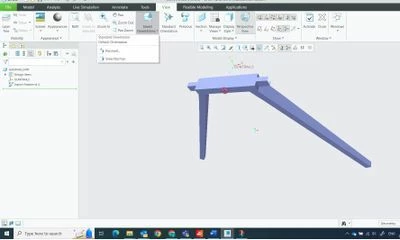
Creo View Screenshot 2023-08-21.jpg

I am using Creo Parametric Release 9.0 and Datecode9.0.0.0

I've just dug out on old, legacy (10 years) creo parametric file and opened in Parametric 9. When I look under View->Saved Orientations I don't get the standard lists of Front, Back, Top etc (see screenshot above). Do I need to somehow convert to latest Creo version to recover that, or is there something else I should do? Or do I need to start again? Under File I do not see File>Import.

Best answer by hadardor

Hello, 

I checked part you attached and it does not look a Creo native file .. It should be from STEP/IGES or any other format imported into Creo and then saved as .prt.

It can also be created by create a new file by an empty template like what StephenW said.

For such files, there is no predefiend view orientation.


2 replies

KenFarley
21-Topaz II
August 22, 2023

If the views you are looking for aren't there it likely means that they never were. We have Pro/Engineer files that date back far longer than I'd care to remember (1990s) and if I open one of them the views that were created for it are still there. You could just redefine the views - probably much simpler than rebuilding the geometry in the file.

As for import, the only place I see that is via Get Data->Import, but that seems to be only intended to bring in non-Creo data, like STEP, IGES, etc.

23-Emerald III
August 22, 2023

Just to add to what Ken said, views names are not standard, they are something that is part of your start part established by whoever manages your system. A empty creo part has no view names, no datums, no layers, no parameter, no relations, nothing, it's empty.

If you have to deal with these parts alot, I would suggest making a mapkey that orients and saves the view and any other info you would like to have included.

hadardor17-PeridotAnswer
17-Peridot
September 12, 2023

Hello, 

I checked part you attached and it does not look a Creo native file .. It should be from STEP/IGES or any other format imported into Creo and then saved as .prt.

It can also be created by create a new file by an empty template like what StephenW said.

For such files, there is no predefiend view orientation.