

5-Regular Member
May 3, 2023
Solved

Import Toolbox from Solidworks

  • May 3, 2023
  • 1 reply
  • 4970 views

I am using Creo Parametric Release 8.0 and Datecode8.0.7.0

I'm trying to import some component from Solidworks Toolbox. When the component has a configuration name different from "Default", the asm.mbr.name attribute and the name in the tree of the component is "NAME(CONFIGURATION)". I can never manage this name and also appear in the attribute of the BOM table 
Best answer by MartinHanak

@Fortech wrote:

Ok, it is clear.

Attached some samples of the wrong behaviour.

As you can see in the picture I can't change the parameter asm.mbr.name


Thanks


Hi,

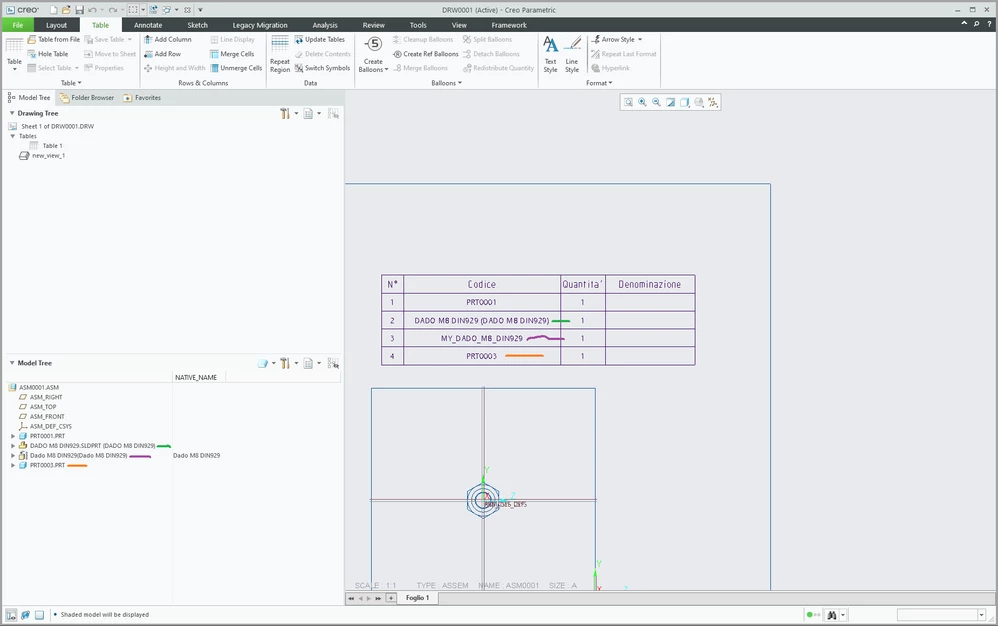
MartinHanak_1-1683285855790.png


green item (your solution)

  • File > Open
  • component cannot be renamed


violet item

  • File > Import (Open button switched to Import)
  • component can be renamed
  • component name is not visible in model tree
  • component name is displayed in repeat region


orange item

  • File > New ... new empty part
  • Get Data > Import ... SLDPRT imported
  • component can be renamed
  • component name is visible in model tree
  • component name is displayed in repeat region


Suggestion: Use violet or orange "solution".

1 reply

24-Ruby III
May 3, 2023

Hi,

please upload test data. You can also ask PTC Support.

Fortech5-Regular MemberAuthor
5-Regular Member
May 4, 2023

2023-05-04_08h45_55.png

24-Ruby III
May 5, 2023

@Fortech wrote:

2023-05-04_08h45_55.png


Hi,

the picture does not enable me to investigate your problem. Please upload test data.