
1-Visitor
June 13, 2013
Solved

Issues with the free Academic Download please help me! - Unanswered

  • June 13, 2013
  • 2 replies
  • 4898 views

EDIT: I am an idiot. I have since realised that I had to type my license code in at some point. I didn't. I have typed it in and 'installed' a license using the Download Manager. I opened Creo 2.0 and the same error came up, even after restarting! Do I really have to uninstall and redownload?


Hi everyone,


So, i spent two hours waiting on the HTTP academic download link (zip file). But it was unfortunately corrupt.

I tried the smaller Download Manager .exe which downloads from within the program.


Thankfully, I now have the following icons on my desktop:

  • Creo Parametric 2.0
  • ModelCHECK
  • Creo Simulate 2.0
  • Thermal
  • Structure
  • Creo Help 2.0


Therefore, I assume the programs downloaded and installed correctly.

However, upon opening Creo Parametric 2.0, I get the following message:
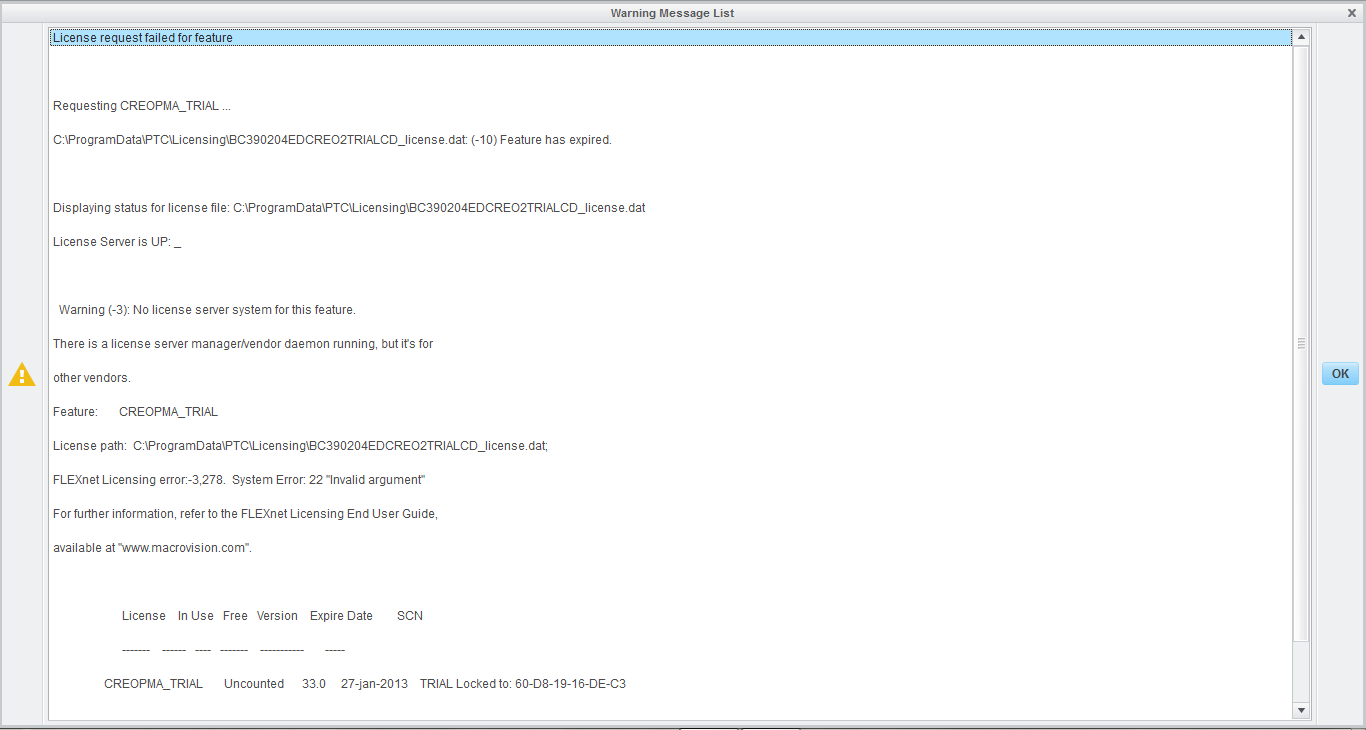
Creo error.png[Click to enlarge]

I assume this is an issue with the license file (if it is there at all).


This also happens when opening Simulate 2.0

This does not occur when opening the ModelCHECK or Help Center.

I also get "Licensing Error 26" upon launching Thermal and Structure


Is anyone able to suggest a solution?


I am only trying to install this as I am fed up with the limited capabilities of the software I currently use - Pro/DESKTOP 8.0


Thanks in advance, Tom

Best answer by MartinHanak

2 weeks ago I was able to download zip file successfully. Try download it using Download manager link -OR- ask someone who has better Internet connection.

Martin Hanak

2 replies

1-Visitor
June 13, 2013

So found in C:\Program Data\PTC\Licensing that I have a license file left over from my trial version, as well as the student license. I sent the trial license to the recycle bin, but it still didn't work. Any other ideas?

Thanks, Tom

24-Ruby III
June 14, 2013

Thomas,

in CR2\Creo 2.0\Parametric\bin directory you can find parametric.psf file, open it in Notepad.

Locate ENV=PTC_D_LICENSE_FILE-= line. Behind equal sign you have to enter the path to your license file.

Locate ENV=CREOPMA_FEATURE_NAME= line. Behind equal sign you have to enter the name of Creo Parametric license. You can find the name in license file behind INCREMENT keyword. It begins with PROE text string.

Martin Hanak

24-Ruby III
June 14, 2013

Hi Thomas,

Try to fill "Academic Support Request", here: http://www.ptc.com/appserver/wcms/forms/index.jsp?&im_dbkey=142574&icg_dbkey=482

1-Visitor
June 14, 2013

Thanks for the fast reply!

Since filing an academic support request (and uninstalling), I was sent a new license file by PTC. Unfortunately, the Installation Assistant now crashes while 'attempting to retrive availible application information'. I have no way of telling whether or not the new license has worked, though.

Is this a common problem?

Thanks, Tom.

24-Ruby III
June 14, 2013

Do not use WEB installer, download 4GB full package and install from it.

Martin Hanak