
1-Visitor
September 11, 2014
Solved

Just installed Creo 3

  • September 11, 2014
  • 2 replies
  • 2267 views

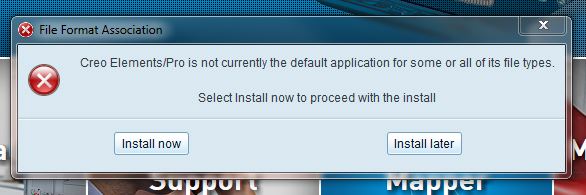
Hello all, i just installed Creo 3 out of curiousity. I have no immediate plans to start working with it, justed wanted a look. I currently work with Creo 2 & Creo Elements/Pro 5. I configured my Creo 3 install, start up directory, config files etc. all looks ok so far. I was a little nervous my other 2 versions would screw up, but thankfully they fire up fine, apart from one thing with the older Creo Elements/Pro. I get the following message alert (see image). I have just been clicking 'Install later' & things seem to work fine from there on in, but i don't want to see this message every time i launch the software. What would happen if i clicked 'install now'? It is vitally important that i can continue to work with this version, because many my customers still use this. Any advise would be greatly appreciated.
Capture.JPG

Regards

John


This thread is inactive and closed by the PTC Community Management Team. If you would like to provide a reply and re-open this thread, please notify the moderator and reference the thread. You may also use "Start a topic" button to ask a new question. Please be sure to include what version of the PTC product you are using so another community member knowledgeable about your version may be able to assist.
Best answer by Mahesh_Sharma

This is due to product view and to correct this, browse to <Install location Wildfire 5.0>\install\addon and execute ProductView_Express_32_64.msi and repair the installation.

2 replies

17-Peridot
September 11, 2014

That would scare me too

Happy to see more adventurous people doing this with success.

Did you have to get a new license file from PTC or did Creo 3 work with the current license?

1-Visitor
September 11, 2014

Hi Antonius, a new license file was required. I did some further testing this afternoon, everything seems fine apart from the message alert mentioned above. I will try Mahesh's suggestion tomorrow to see if it cures it. First impressions, the UI is very similar to Creo 2, almost identical in fact. They appear to have changed/rehashed all the icons, I don't think transitioning from 2 to 3 will be a problem. I copied my config files & UI customisation file from Creo 2 to 3, & they seem to transfer ok, my mapkeys appear to work, but I may not have tried them all.

I was eager to try the new "unite technology", I opened a native inventor model & got 1/4 of a model, the same model opened ok in Power Shape, so not such a great start there.

John

15-Moonstone
September 11, 2014

I believe alot of the "unite technology" isn't there until build M030.

Mahesh_Sharma
22-Sapphire I
September 11, 2014

This is due to product view and to correct this, browse to <Install location Wildfire 5.0>\install\addon and execute ProductView_Express_32_64.msi and repair the installation.

1-Visitor
September 12, 2014

Thanks Mahesh, that was obviously the root of the problem, i did as you instructed, & it launches cleanly now.

Thanks again

John

1-Visitor
September 12, 2014

Just noticed something kind of weird. I have a gap between icons in the quick acces toolbar. When i hover over the gap, 'rename' appears. I have this command added to the toolbar, i use it frequently. The icon is there, only now, it does not have a picture associated with it. In Creo 2, the rename icon has a picture. If you access this command through File, Manage File, then the rename command icon has a picture. I know in the scheme of things this is a minor issue, it just strikes me as strange.

John