

Question
Layer default
Running CREO 2. How do I stop the creation of default layers? I have a start part that has the layers I need with rules.
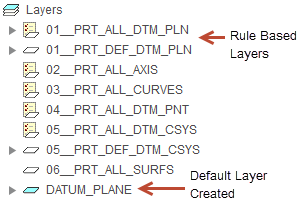
I have two datum plane layers. One for default and one for everything else. I create a new part using my start part. Create a datum plane. The datum plane I created goes to my rule base layer but also creates a default layer. I can delete the default layer but if I create another datum plane it creates another default layer.
See below. Is this a Config setup issue? If so can I change it and how?
This thread is inactive and closed by the PTC Community Management Team. If you would like to provide a reply and re-open this thread, please notify the moderator and reference the thread. You may also use "Start a topic" button to ask a new question. Please be sure to include what version of the PTC product you are using so another community member knowledgeable about your version may be able to assist.