1-Visitor
September 13, 2016
Solved

License server stopped working

  • September 13, 2016
  • 2 replies
  • 3426 views

Suddenly all Creo users are getting a "Your evaluation license has expired". We were not using an evaluation license and it's been working flawlessly for the 2 years I've been here.

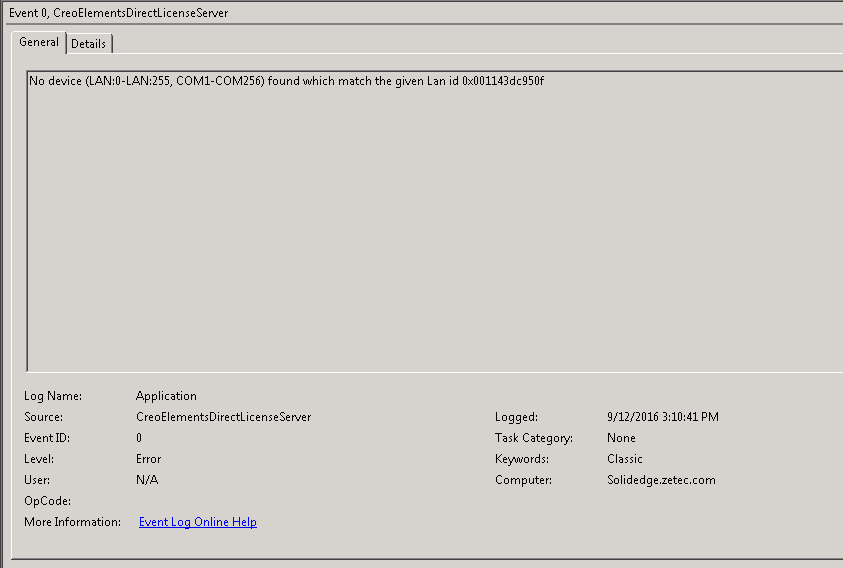
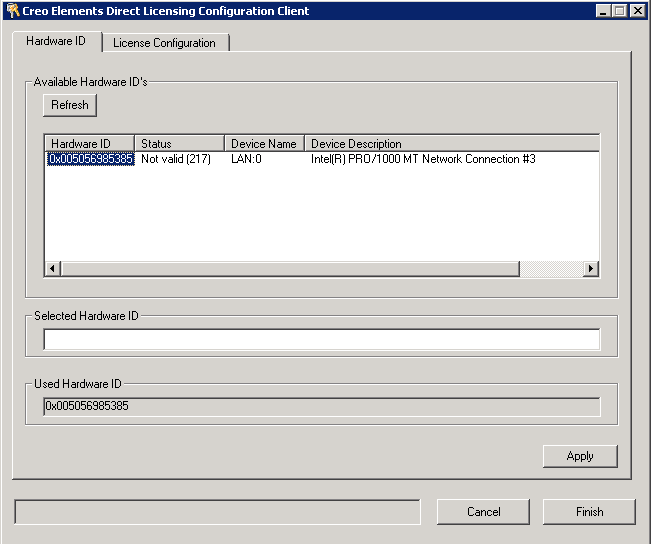
To my knowledge (I'm not the only one with access to the server) nothing has changed and I can't find any reference to the below issue, "Not Valid (217)".  The second screenshot is an error in the event viewer that comes up numerous times starting when the trouble started.

Anyone have any idea where to start?
Thanks for any help!!

Best answer by MartinHanak

Hi,

I guess that 00-50-56-98-53-85 MAC address belongs to virtual machine.

Creo Elements Direct License server is looking for network card with 00-11-43-dc-95-0f MAC address. Maybe this card has been disabled. Open Computer Management console and check network card status in Device Manager category.

MH

2 replies

23-Emerald III
September 13, 2016

If you have current maintenance, you should file a support ticket with PTC.

If not, you may be in the wrong forum for quick assistance if this is for creo element direct.

If Creo elements direct is appropriate, Toby Metcalf‌ can move the question to  Creo Elements/Direct

24-Ruby III
September 14, 2016

Hi,

I guess that 00-50-56-98-53-85 MAC address belongs to virtual machine.

Creo Elements Direct License server is looking for network card with 00-11-43-dc-95-0f MAC address. Maybe this card has been disabled. Open Computer Management console and check network card status in Device Manager category.

MH

calbert1-VisitorAuthor
1-Visitor
September 30, 2016

Thanks for the assistance. I found shortly after posting that changing the MAC address of the NIC (it is a virtual machine) to what Creo was looking for fixed it. Still unknown why the MAC changed, but all is working after simply changing it to 00-11-43-dc-95-0f.

Cheers