

7-Bedrock
January 8, 2025
Solved

Licensserver does not start

  • January 8, 2025
  • 4 replies
  • 1277 views

Hello,

i want to install Creo6 with Win11 on an new computer. The licensfile is ok, only windows firewall is installed.

When i start the licensidentification everything looks ok, after dropping the licensfile into i get the message "is started" but after this nothing happens and no further reaction or message (also after some minutes).
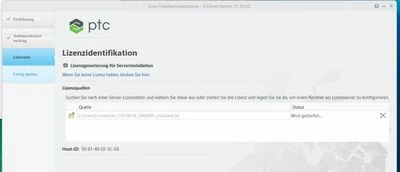
Screenshot 2025-01-08 115637.jpg

What is the problem?

Thanks Alex

Best answer by AlexZ

Problem is soved, installed C++ with older versions and opened 7788 in the firewall. Then it worked. Also Creo 6.0 runs with Win11 till now without problems.

Thanks for your helps Alex

4 replies

Dale_Rosema
23-Emerald III
23-Emerald III
January 8, 2025

Whenever I have something like this to do, I get my VAR involved. It usually gets things done quicker.

16-Pearl
January 8, 2025

If I remember correctly, I had this exact problem a couple of times in the past, with license server hanging on “Starting” status. The solution was to install Visual C++ Redistributable libraries, as some components were missing in the operating system.

You can check installation media for addons or prerequisites, there should be Visual C++ installers included you can use.

AlexZ7-BedrockAuthor
7-Bedrock
January 13, 2025

Thanks.

But did not work.

23-Emerald III
January 13, 2025

Basic check - Does Creo 6 run on Windows 11?

Article - CS348041 - Compatibility of Creo Parametric with Microsoft Windows 11

The answer is NO.

AlexZ7-BedrockAuthor
7-Bedrock
January 13, 2025

ok, thats interessting.

Just insatled Creo4 with the old licensmanager and it seems to work. With creo6 it does not work, here the licensmanager makes problems, can not get my lizens free.

Thanks for yout hint.


AlexZ7-BedrockAuthorAnswer
7-Bedrock
January 23, 2025

Problem is soved, installed C++ with older versions and opened 7788 in the firewall. Then it worked. Also Creo 6.0 runs with Win11 till now without problems.

Thanks for your helps Alex