

13-Aquamarine
March 30, 2023
Solved

manual update trigger

  • March 30, 2023
  • 1 reply
  • 1294 views

This is a question that will apply for some of our customers that use a master-image based IT-infrastructure (cloud, vm, deployed machines).

Would there be a way to prevent the update from being executed for a certain group of users, so that admins could update the master-image when doing other updates and patches?
Kristof_D_0-1680184953265.png


Best answer by mfischer

Hi @Kristof_D 

The install of Creo+ will be based on the entitlement provided to the user.  Some users might require additional components than others.  This is dependent on the type of extensions that are assigned to one user versus the other.  The PTC Control Center manages the deployment and updates.  You would not need to include it in the Master-image.  The install for Creo+ will be in the users <USER_PROFILE> directory.


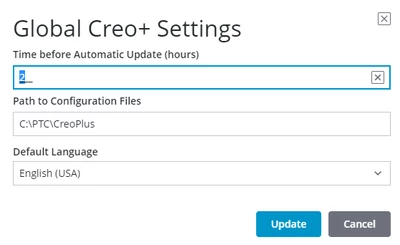
The setting to delay the deployment for all users is controlled in the GLOBAL SETTING.  The default value is 0....but can be set to a defined hour delay.


Thanks,
Mark

1 reply

mfischer18-OpalAnswer
18-Opal
March 30, 2023

Hi @Kristof_D 

The install of Creo+ will be based on the entitlement provided to the user.  Some users might require additional components than others.  This is dependent on the type of extensions that are assigned to one user versus the other.  The PTC Control Center manages the deployment and updates.  You would not need to include it in the Master-image.  The install for Creo+ will be in the users <USER_PROFILE> directory.


The setting to delay the deployment for all users is controlled in the GLOBAL SETTING.  The default value is 0....but can be set to a defined hour delay.


Thanks,
Mark

Kristof_D13-AquamarineAuthor
13-Aquamarine
April 13, 2023

That's a great system, I really like how lean this is set up.

Would it then be a good suggestion to exclude this folder from security checks like the antivirus to limit the impactions the speed?
C:\Users\%username%\AppData\Local\PTC