Dale_Rosema
23-Emerald III
23-Emerald III
August 29, 2018
Solved

Mapkey / Shortcut Key conflicts

  • August 29, 2018
  • 1 reply
  • 4562 views

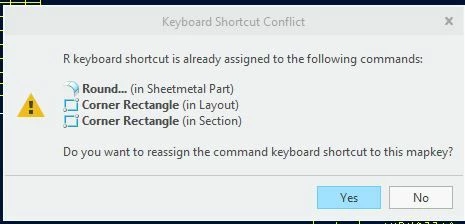
I am working on creating a mapkey to insert a table. When I create the mapkey - "rrrr" - just a test mapkey, I get the following error:


Mapkey_Error.JPG


Is there a way to know what short keys are out there and how many conflict there might be?

Thanks, Dale

Best answer by Dale_Rosema

Thanks Chris3,


From the Creo Parametric Options page, is there a way to list all the shortcut keys from all sections vs clicking on the various modes?


(added)

I just found in that same area:

Category: All Modes

Show: Commands with assigned shortcuts


Most modes have Activate (with Ctrl+A). It looks like you can have the same short cut under different modes. If I understand correctly, mapkeys work across all modes (though you may have to set the mode in order to execute the commands of the mapkey). Because of this, that is why mapkeys cannot have the same callout as any of these other shortcuts.




1 reply

21-Topaz I
August 30, 2018

File -> Options -> Customize -> Keyboard Shortcuts.


This help page has more detailed info:

http://support.ptc.com/help/creo/creo_optm/usascii/index.html#page/optm/options_modeler/fund_three_sub/keyboard_shortcut.html

Dale_Rosema
23-Emerald III
Dale_Rosema23-Emerald IIIAuthorAnswer
23-Emerald III
August 30, 2018

Thanks Chris3,


From the Creo Parametric Options page, is there a way to list all the shortcut keys from all sections vs clicking on the various modes?


(added)

I just found in that same area:

Category: All Modes

Show: Commands with assigned shortcuts


Most modes have Activate (with Ctrl+A). It looks like you can have the same short cut under different modes. If I understand correctly, mapkeys work across all modes (though you may have to set the mode in order to execute the commands of the mapkey). Because of this, that is why mapkeys cannot have the same callout as any of these other shortcuts.


21-Topaz I
August 30, 2018

Yes, there is an "all modes" option in the drop down. There will also be a "Resolve Conflicts" button if you do have conflicts that will show you any conflicts you have.

Capture.PNG