

12-Amethyst
February 25, 2026
Solved

Mapkey toggeling in Creo 12

  • February 25, 2026
  • 1 reply
  • 80 views

Hi

Since Creo 4 we're using toggling mapkeys.

Starting with Creo 12 the loading of mapkeys has change and is no longer possible.
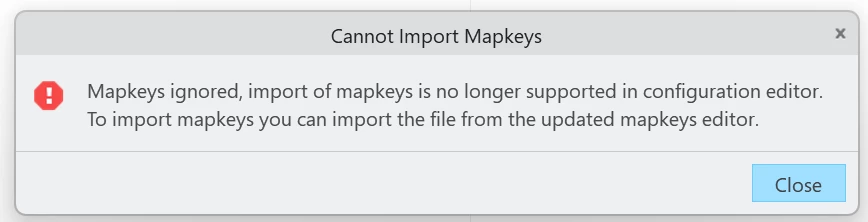
Erros message from executing a toggling mapkeyErros message from executing a toggling mapkey


Any hints how our existing mapkeys could be modified?

Thanks,
Ziegi

---


Example from a config.pro file

! ------------------------------------------------------------
! Show Curves on/off  | F9
! ------------------------------------------------------------
!
mapkey $F9 @MAPKEY_LABELcurves On/Off (F9);~ Command `ProCmdViewLyrs` 1;\
mapkey(continued) ~ Select `main_dlg_cur` `PHTLeft.PHLayerUI.AssyTree` 1 `node0:CURVES`;\
mapkey(continued) %_F9toggle; %_F9load;~ Command `ProCmdViewLyrs` 0;\
mapkey(continued) ~ Command `ProCmdViewRepaint`;
! Additional Mapkeys to enable toggeling function of "main mapkey" F9
mapkey _F9toggle ~ Command `ProCmdViewHide`; %_F9_s1;
mapkey _F9_s1 @SYSTEMEcho mapkey _F9toggle \~ Command `ProCmdViewShow`\;\
mapkey(continued) \%_F9_s0\; > sw.pro\;;
mapkey _F9_s0 @SYSTEMEcho mapkey _F9toggle \~ Command `ProCmdViewHide`\;\
mapkey(continued) \%_F9_s1\; > sw.pro\;;
mapkey _F9load @MAPKEY_NAMEload mapkey;~ Command `ProCmdRibbonOptionsDlg` ;\
mapkey(continued) ~ Select `ribbon_options_dialog` `PageSwitcherPageList` 1 `ConfigLayout`;\
mapkey(continued) ~ Select `ribbon_options_dialog` `ConfigLayout.ImportExportBtn`;\
mapkey(continued) ~ Activate `ribbon_options_dialog` `ConfigLayout.Open`;\
mapkey(continued) ~ Activate `file_open` `Current Dir`;\
mapkey(continued) ~ Activate `file_open` `Ph_list.Filelist` 1 `sw.pro`;\
mapkey(continued) ~ Activate `ribbon_options_dialog` `OkPshBtn`; @SYSTEMDel sw.pro;
!

Best answer by Ziegi

I found the culprit. The loading of mapkeys from a *.pro-file is different.


Below the updated mapkey to load the temporary mapkey (sw.pro).

mapkey _F9load ~ Select `main_dlg_cur` `appl_casc`;\
mapkey(continued) ~ Close `main_dlg_cur` `appl_casc`;~ Command `ProCmdUtilMacros` ;\
mapkey(continued) ~ Select `mapkey_main` `ImpExpCascButton`;\
mapkey(continued) ~ Close `mapkey_main` `ImpExpCascButton`;\
mapkey(continued) ~ Activate `mapkey_main` `psh_import`;\
mapkey(continued) ~ Trail `` `` `DLG_PREVIEW_POST` `file_open`;\
mapkey(continued) ~ Select `file_open` `Ph_list.Filelist` 1 `sw.pro`;\
mapkey(continued) ~ Activate `file_open` `Ph_list.Filelist` 1 `sw.pro`;\
mapkey(continued) ~ Activate `mapkey_main` `CloseButton`;\
mapkey(continued) ~ Activate `unsaved_mapkeys` `yes`;\
mapkey(continued) @SYSTEMDel sw.pro;


1 reply

24-Ruby III
February 26, 2026

Article - "About error "Mapkeys ignored, import of mapkeys is no longer supported in configuration editor." in Creo Parametric": https://www.ptc.com/en/support/article/CS445938 

Ziegi12-AmethystAuthorAnswer
12-Amethyst
February 27, 2026

I found the culprit. The loading of mapkeys from a *.pro-file is different.


Below the updated mapkey to load the temporary mapkey (sw.pro).

mapkey _F9load ~ Select `main_dlg_cur` `appl_casc`;\
mapkey(continued) ~ Close `main_dlg_cur` `appl_casc`;~ Command `ProCmdUtilMacros` ;\
mapkey(continued) ~ Select `mapkey_main` `ImpExpCascButton`;\
mapkey(continued) ~ Close `mapkey_main` `ImpExpCascButton`;\
mapkey(continued) ~ Activate `mapkey_main` `psh_import`;\
mapkey(continued) ~ Trail `` `` `DLG_PREVIEW_POST` `file_open`;\
mapkey(continued) ~ Select `file_open` `Ph_list.Filelist` 1 `sw.pro`;\
mapkey(continued) ~ Activate `file_open` `Ph_list.Filelist` 1 `sw.pro`;\
mapkey(continued) ~ Activate `mapkey_main` `CloseButton`;\
mapkey(continued) ~ Activate `unsaved_mapkeys` `yes`;\
mapkey(continued) @SYSTEMDel sw.pro;