8-Gravel
October 8, 2025
Solved

ModelCheck Setup

  • October 8, 2025
  • 3 replies
  • 677 views
I am using Creo Parametric Release 10.0 and Datecode10.0.8.0

While trying to set up ModelCheck, the instructions say to go to "To configure the Creo ModelCHECK settings, click File > Options > Environment > ModelCHECK Settings." However, that menu option (Environment) is not available to me.

How do I get File > Options > Environment to become available to me?

Here are the errors that I faced
None

    Best answer by Mahesh_Sharma

    Hi @jm_01_10512334 


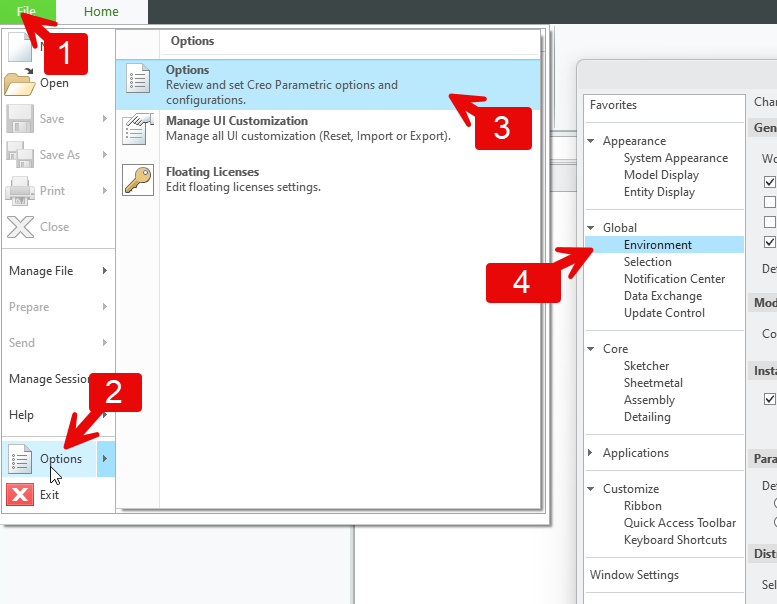
    Environment option to configure ModelCHECK settings is in Creo Parametric Options window. Is it not there as in below image in your installed Creo? 


    3 replies

    23-Emerald III
    October 8, 2025

    Are you an administrator? There is a ModelCheck setting that will block normal users from being able to modify the files.

    8-Gravel
    October 8, 2025

    Thanks, Ben.  I have no clue how to check for that...  (Obviously, I am not.)

    16-Pearl
    October 8, 2025

    Was ModelCHECK installed with Creo Parametric?  Look for <Creo Load Point>\Common Files\modchk.

    8-Gravel
    October 8, 2025

    Yes, that folder is present.

    22-Sapphire I
    October 8, 2025

    Hi @jm_01_10512334 


    Environment option to configure ModelCHECK settings is in Creo Parametric Options window. Is it not there as in below image in your installed Creo? 


    8-Gravel
    October 9, 2025

    I must be getting old.  I overlooked that for hours, but there it is - right in front of my face. 😲🙄

    Thanks @Mahesh_Sharma