
13-Aquamarine
March 27, 2017
Solved

Modify dimensions of a sweep part after finalize/saving...

  • March 27, 2017
  • 2 replies
  • 2626 views

What is the succession of steps to modify a sweep part after the part was finalized and saved?

I will attach a simple part as an example, I want to change the 200 mm length of the sweep to 350 mm (for example).

I have tried going to Edit Definitions, but no matter what I do, I cannot get all the way back to the dimensions that I need to modify... I want to be able to change the dimensions similarly as one can do that for an extrude feature (for example), where you edit after the initial creation and modify the depth of the extrude, or the length or width associated with it. When it comes to a sweep feature, I cannot make it all the way deep to the initial curve sketching level. I am using Creo 3.0.
Thank you, Colin.
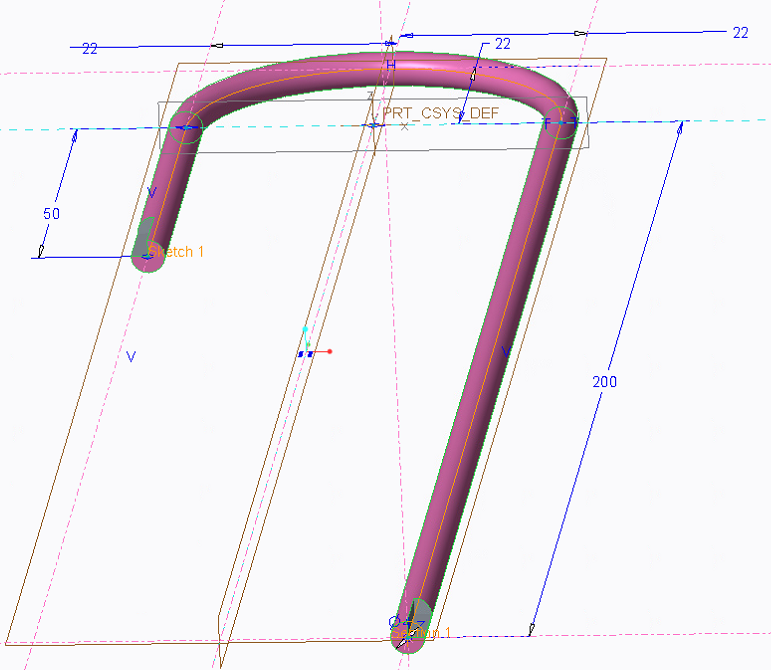
Best answer by MartinHanak

Hi,

simply doubleclick sweep geometry in graphics windows and you will see this ...

MH

2 replies

24-Ruby III
March 28, 2017

Hi,

simply doubleclick sweep geometry in graphics windows and you will see this ...

MH

13-Aquamarine
March 28, 2017

This really does it, it must be a Creo 3.0 thing, because I tried it in Creo 2.0 and it does not work. But in Creo 3.0 it works like a charm, it is so easy and simple now, great stuff! Thank you!

StephenW
23-Emerald III
March 28, 2017

To simply edit the dimensions, do as Martin says above, quick and easy.

To edit the actual sketch, expand the sweep feature, then Edit definition on the sketch, that will put you back in to the sketcher mode.

13-Aquamarine
March 28, 2017

Stephen, this is exactly what I was trying to do, in the spirit of the Creo 2.0 habits, but it does not work for me -- I do not get to the editing of dimensions no matter what I try -- probably missing something here. But Martin's suggestion is all I need to move forward, thank you all!!

StephenW
23-Emerald III
March 28, 2017

Oh, yup, I'm in Creo 3.