3-Newcomer
August 6, 2024
Solved

MTL file encoding format question

  • August 6, 2024
  • 2 replies
  • 2053 views

I am using Creo Parametric Release 8.0 and Datecode8.0.9.0

I am creating .MTL files to represent materials in Creo. I have noticed that certain special characters get transformed by Creo into other text strings. For example, “ turns into “ What encoding is used by Creo MTL files (is it some variant of ISO-8859?). I don't think it is ISO-8859-1 (Latin alphabet 1), because the resulting characters include glyphs that are not in that encoding (ex: €).

Here are the errors that I faced
None

Best answer by Chris3

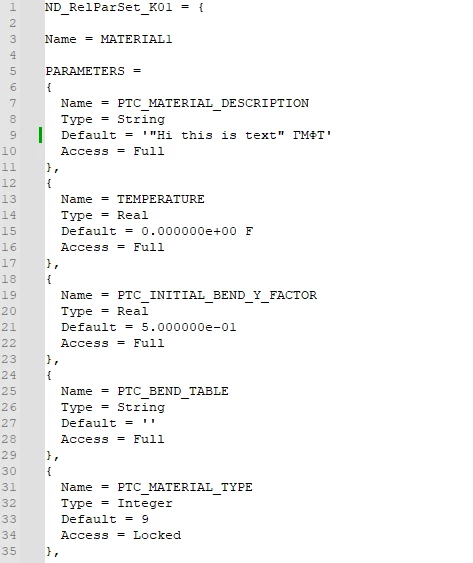
I saved a .mtl from from Creo (9.0.7), Added your text using notepad++, imported the mtl file and exported it back out.


Edited mtl file (the import):

import.PNG

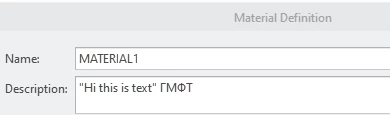
In Creo:

Capture.PNG

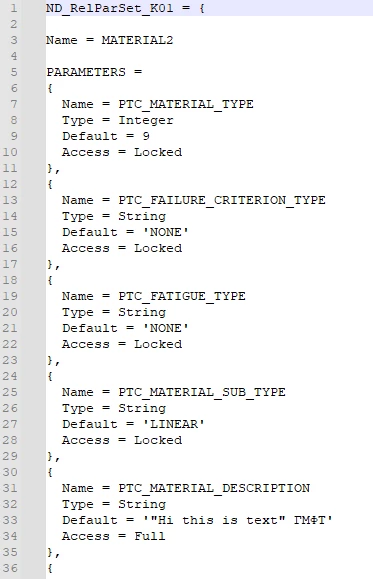
Exported back out:

export.PNG


I am not sure why Creo reordered the parameters but the text did not change from import to export.

2 replies

21-Topaz II
August 6, 2024

When I look at the .mtl files on my particular installation (9.0.1) they appear to be nothing but regular text. I don't see any characters beyond those in the nominal ASCII character set. You'd have to ask actual PTC folks about it, but this stuff looks like the kind of files you would have seen in the old DOS days.

Likely the code in Creo that reads these isn't equipped to handle characters beyond the ancient text 128 character ASCII set? I don't know.

21-Topaz I
August 6, 2024

Notepad++ says it is UTF-8-BOM which is the same as UTF-8 only there are a few bytes at the start of the text to let the reader know that it is UTF-8.


In my mtl files a " is surrounded by ' and doesn't get encoded:


'"Hi this is text"'
3-Newcomer
August 6, 2024

If you try an MTL file which contains special characters beyond ASCII 128 (at least in my system), a transform occurs upon MTL import.  If you edit the material in the Creo UI, it seems to handle the special characters fine, but the MTL import is where a transform occurs.


If you wouldn't mind, try ГМФТ applied to a string Parameter value in the MTL file, then import the MTL file.  When I do this, the string changes to Ð“МФТ

Chris321-Topaz IAnswer
21-Topaz I
August 6, 2024

I saved a .mtl from from Creo (9.0.7), Added your text using notepad++, imported the mtl file and exported it back out.


Edited mtl file (the import):

import.PNG

In Creo:

Capture.PNG

Exported back out:

export.PNG


I am not sure why Creo reordered the parameters but the text did not change from import to export.